
What We Build
AI Solutions for Nonprofits, Built and Running
Every solution on this page is built, tested, and can be customized for your organization. Each one runs on systems you already own, is fully accessible from day one, and belongs to you outright. No NonprofitNext subscription, no per-user licensing, and no vendor lock-in.
Built With Independent Living Centers
Built for a Specific Problem. Designed to Adapt.
Every tool below began as a real problem at a real nonprofit, most of them Centers for Independent Living, the field where our team spent more than 30 years. None of them is limited to that field. We configure each one around your programs, your data, your reporting requirements, your inventory, your knowledge base, and your workflows.
A leadership dashboard built for disability services can track meals distributed for a food bank or job placements for a workforce program. A QR system built for donated assistive technology can manage laptops, instruments, tools, supplies, or event equipment. An information and referral assistant can become a program navigator, a staff knowledge assistant, a volunteer resource, or a public help desk. If your staff answer the same questions every day, compile board reports by hand, document services against a funder’s rules, or track donated goods on a spreadsheet, these tools already fit your work.
Knowledge and Resource Assistant
AI Knowledge and Resource Assistant
Your staff know the answers. The problem is finding them quickly, especially when your office is closed. This assistant answers in plain language from information your organization has approved: a resource directory, program details, internal procedures, or any other knowledge you choose. Available 24/7, it answers after hours when your office is closed and during business hours when your staff are helping others.
Our first implementation is the Virtual Information and Referral Assistant at Direct Advocacy and Resource Center. A visitor asks in their own words, “I need a ramp for my house,” and the assistant answers from the organization’s own referral directory with the services that match their location, including phone numbers, hours, and eligibility. If nothing fits, it says so, offers the office phone number, and logs the question for staff. It never improvises a referral. As it works, it builds the reporting counts your funders ask for, and the questions it could not answer become a running map of unmet need.
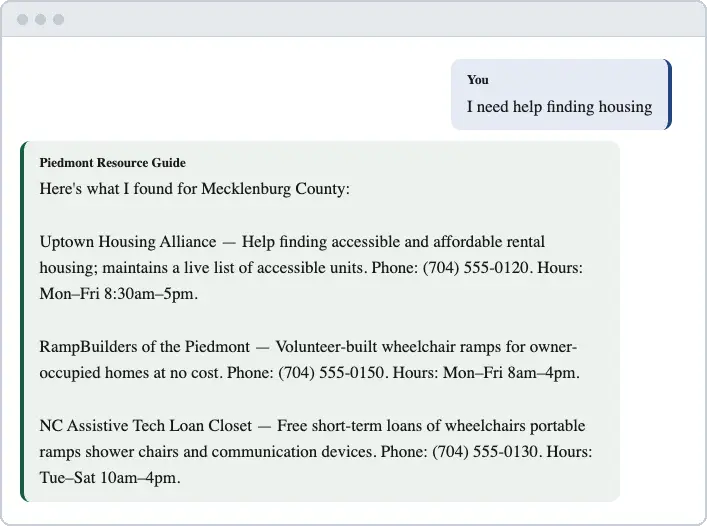
Running in production at Direct Advocacy and Resource Center in Tucson.
- Available around the clock
- Answers only from your directory
- Reports build themselves
Other ways this assistant can work: a program navigator (Am I eligible? What documents do I need?), a staff knowledge assistant for policies and procedures, a volunteer assistant, a member or constituent assistant, or a community FAQ assistant for donors and the public. It uses only your approved information and never invents an answer.
- The problem it solves
- The same questions arrive all day and after hours, and the answers sit in a directory or handbook nobody can search quickly.
- Who uses it
- Community members on your website, or your own staff and volunteers.
- What you provide
- A resource directory, program descriptions, or internal documents you already maintain.
- What you own
- The assistant, on hosting you control, with your own AI account.
Leadership Dashboard
Executive360
Your leadership information already exists. It is spread across five systems and reports. Executive360 brings it into one picture, built from the reports your staff already produce every month.
A staff member uploads a few files each month: financial reports, staffing data, fundraising reports, grant reports, and the program or mission data your organization already tracks. Leadership gets days of cash on hand compared against the board’s target, budget versus actual with variances flagged, your mission metrics against annual goals, whatever they are for your organization: people served, meals distributed, students enrolled, performances attended, animals adopted, or job placements, and every grant deadline gathered into one list. Grants from every source live side by side: federal awards, state contracts, local grants, and private foundations, each tracked with the same deadlines, spend-down pacing, and objectives. A written monthly brief summarizes all of it in plain language, ready to share with the board. Individual participant, employee, and donor records never leave your organization’s own computer.
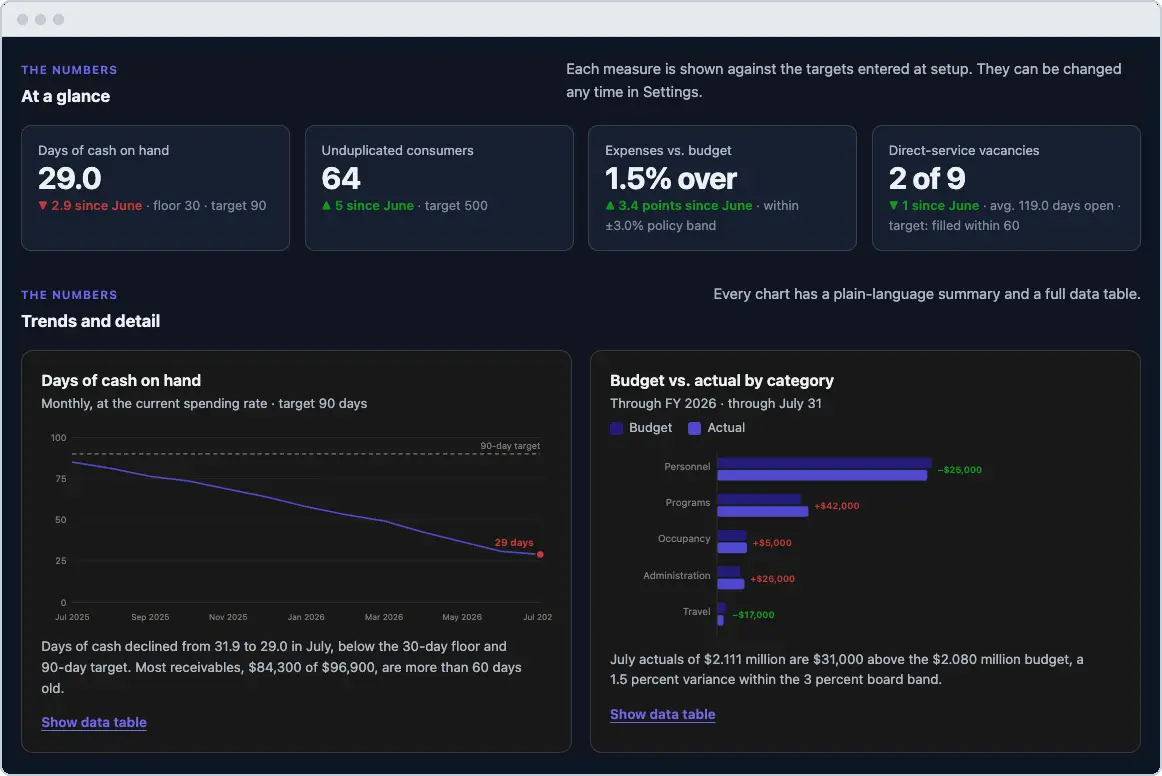
“Having such a tool not only streamlines administrative tasks but also makes reporting to our funders easier and ensures data accuracy. Executive360 also helps direct staff who provide services maintain proper documentation as required by our federal and state funders.”
Available now. Built with Centers for Independent Living, and it reads any nonprofit’s monthly reports: finance, staffing, fundraising, grants, and program results.
- Clear information in one place for your leadership team
- A board-ready brief every month
- Every grant deadline in one list
- Personal records stay on your computer
Also a fit for: food banks, workforce programs, housing nonprofits, youth and education programs, arts organizations, animal welfare, and foundations. Every organization gets the same financial, staffing, fundraising, grant management, trend, and board reporting capabilities.
- The problem it solves
- Leadership compiles cash, grants, staffing, and program results from five separate reports by hand.
- Who uses it
- Executive directors, finance leads, and boards.
- What you provide
- The monthly reports your team already produces.
- What you own
- The dashboard on a server you control, plus the written board brief.
Data Quality and Compliance
Quality Assurance Tool
Reads your program and service records the way a reviewer would. We have not found another tool in this field that does that.
A program lead uploads one spreadsheet export from your case management system. The tool reads the case documentation itself: it verifies that the services each participant chose are actually being delivered, flags services that were never selected, watches for steady progress toward each goal, and highlights records where actions are prescribed to participants rather than chosen by them. The compliance audit arrives in the same packet: what passed, what needs attention, who each item belongs to, and the exact reporting rule behind every finding. The rules come from your funders, not from us, and a new grant’s requirements are a spreadsheet edit, not a software project.
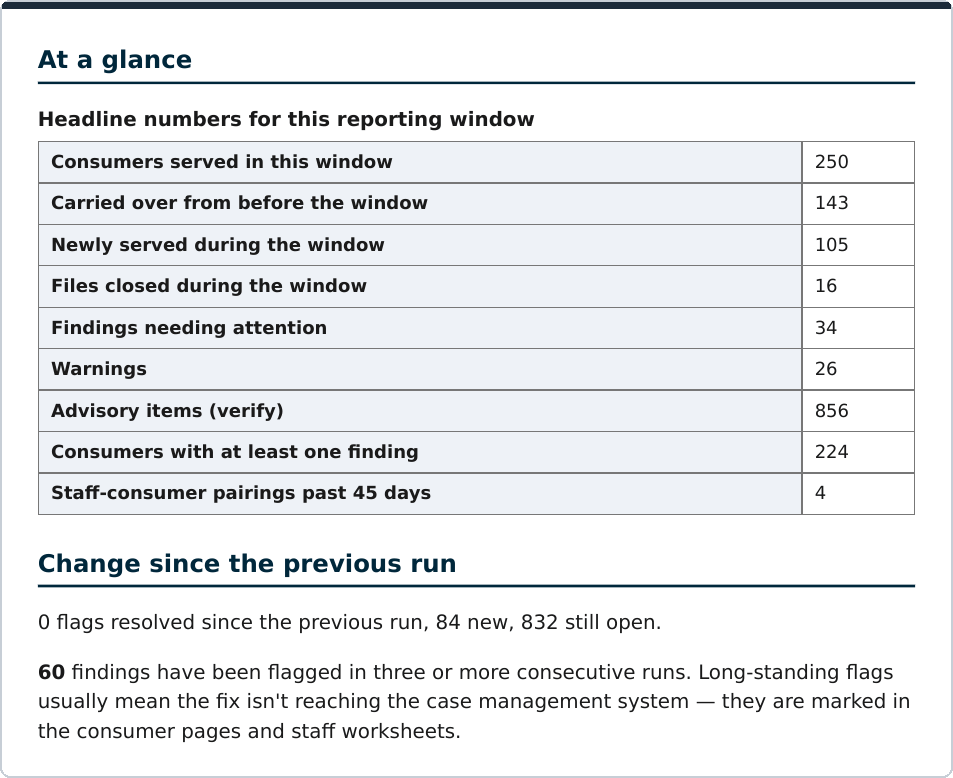
Available now. In acceptance testing against a 260-record seeded dataset, the tool caught every planted problem and raised no false alarms.
- Reads the file the way a reviewer would
- Personal information scrubbed before AI sees anything
- A complete audit in minutes
- Findings routed to the right person
Where else this fits: Housing First and HMIS programs, workforce programs reporting under WIOA, reentry and home visiting programs, refugee resettlement, senior case management under the Older Americans Act, and any program whose funder audits the case file. The rules live in a spreadsheet you control.
- The problem it solves
- Funders audit the case file, and problems surface at reporting time instead of monthly.
- Who uses it
- Program leads and quality staff in documentation-heavy programs.
- What you provide
- One spreadsheet export from your case management system each month.
- What you own
- The tool on your own hosting, with a rulebook written for your program.
Inventory Tracking
Zero Entry Inventory with QR Codes
If your organization still tracks physical items in a spreadsheet, the inventory is wrong the moment someone forgets to update it. This system replaces the spreadsheet with a simple QR-based workflow, built on tools your team already knows.
Donations come in through a Google Form. The system logs each item to the master sheet, generates a printed QR code for the device, and emails the donor a tax receipt automatically, with a copy routed to finance. Checking a device out to a participant is one scan from a phone, and the inventory updates instantly. The whole system runs on Google Forms, Google Sheets, and Zapier, so there is no new software subscription to carry.
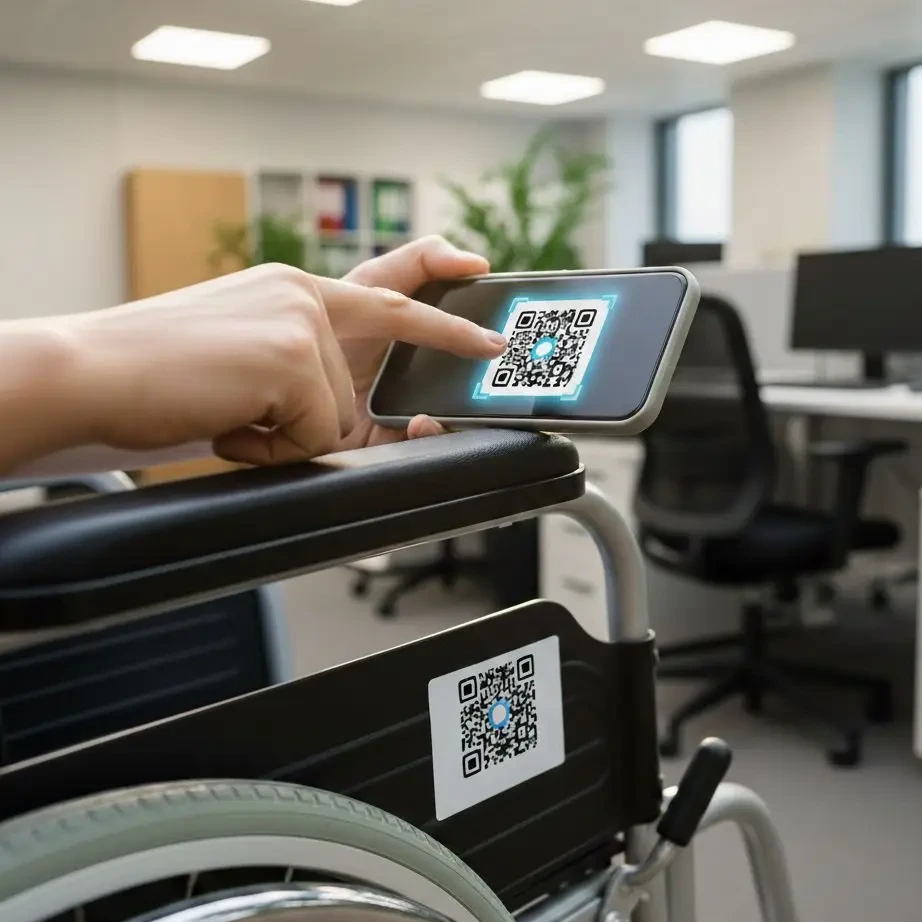
Running in production at Able South Carolina.
- Zero manual data entry
- Tax receipts sent automatically
- Inventory always live and current
What could you track: laptops and hotspots for a workforce program, instruments and costumes for an arts organization, furnishings for a housing program, emergency supplies for disaster response, crates and carriers for animal welfare, event equipment for a community organization, or loaner technology for a school. Receive, tag, locate, assign, check out, return, transfer, retire: the QR code is only the interface.
- The problem it solves
- Spreadsheets drift, donated items go missing, and donor receipts wait for weeks.
- Who uses it
- Anyone who receives, checks out, or distributes equipment and goods.
- What you provide
- Your Google account and a printer for labels.
- What you own
- The forms, the inventory, and the automation, all in your own accounts.
Beyond Independent Living
What Could This Look Like at Your Nonprofit?
The four tools above are the starting points. Here is how they translate into six kinds of organizations we hear from most often.
- Food bank or pantry networkA pantry locator that answers “I need groceries this week and I do not drive” from your own list. Donated goods logged once with automatic tax receipts. A leadership view of pounds distributed against grant targets.
- Housing or shelter programA program navigator that states eligibility before details. A monthly review of case files against HMIS and funder documentation rules. Furniture and move-in kits tracked from donation to the family that received them.
- Workforce developmentA staff assistant that answers WIOA eligibility and documentation questions from your own policies. Individual employment plans and skill gains checked against the case file every month. Placements and retention on one leadership dashboard.
- Legal aid or 211-style helplineRoutine “who can help me with” questions answered after hours from your directory, with anything urgent routed to a person, and a record of the questions nobody could answer as evidence of unmet need.
- Aging services agencyA caregiver assistant that finds respite care or rides to dialysis by county. Older Americans Act assessments and care plans reviewed for completeness. Meals, rides, and units of service on one board-ready dashboard.
- Youth and family servicesProgram and enrollment questions answered for families in plain language. Home visiting and required intake elements reviewed monthly. Laptops, instruments, and program equipment checked out with a phone scan.
Not on this list? The pattern holds for most missions. Tell us about your work and we will describe what a build could look like for you.
What a Build Looks Like
Every engagement follows the same path: Assess, Strategy and Design, then Build and Train. We start with the work that is consuming the most time in your team’s week, design the system that removes it, build on the platforms you already own, and train your staff until the tool is theirs. You own everything we build, including the source. Accessibility is not an add-on: every solution is built and tested before it ships.
See Any of These Running With Sample Data
All four tools have a demonstration system loaded with realistic sample data. Bring the problem that is taking the most staff time and we will show you the tool that fits, live.