
Solution Detail
AI Knowledge and Resource Assistant: Answers With Information From Your Organization
An AI-enabled assistant for nonprofits that lives on your website or inside your organization and answers questions in plain language, at any hour, using only the information you give it. It can point community members to the right program or resource, walk a new client through eligibility requirements, or answer staff questions about policies and procedures. When it does not know, it says so and hands off to a person. It never invents an answer.
One AI-Enabled Assistant for Nonprofits, Configured for Your Organization
The assistant runs on the same underlying software each time. What changes is the information it answers from, who it talks to, and where it lives. These are the configurations we build most often.
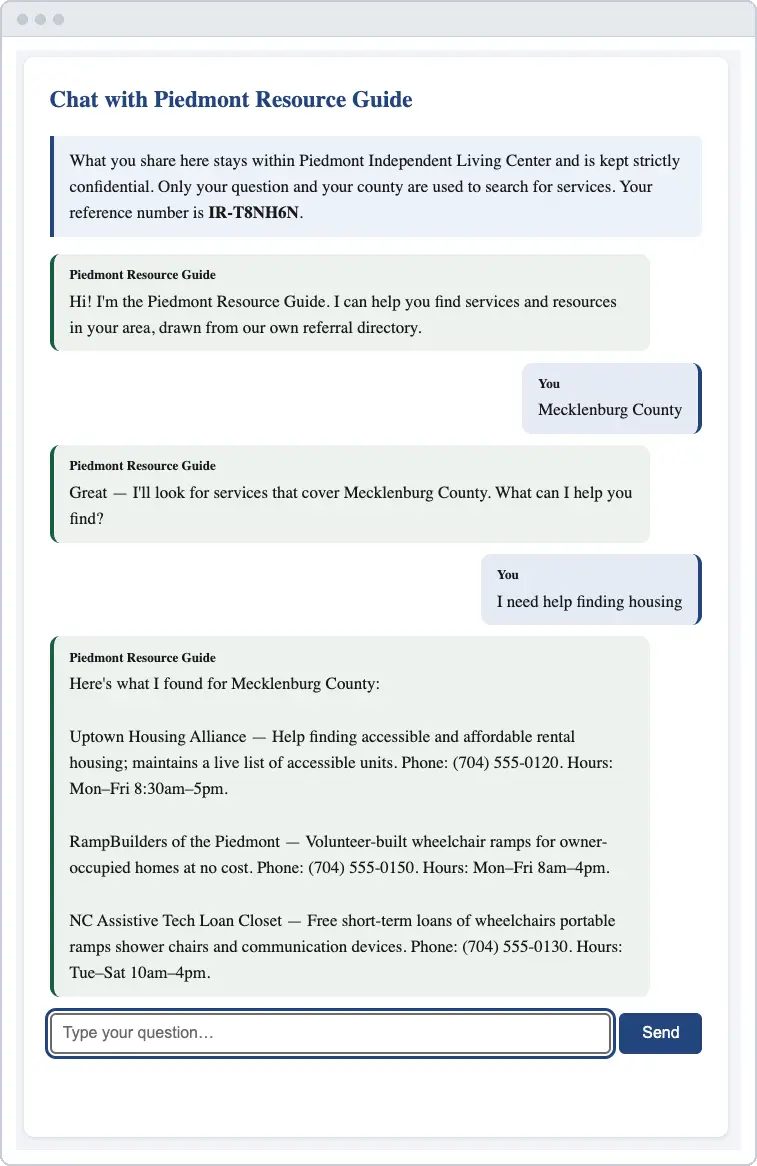
- Information and referralAnswers “who can help me with” questions from your own resource directory, filtered to the individual’s county, with eligibility stated up front. The first configuration built, running at DIRECT in Tucson.
- Program navigator“Which of your programs might help me? Am I eligible? What do I need to bring?” for workforce, housing, youth, legal aid, and family services organizations.
- Staff knowledge assistantStaff ask about internal policies, procedures, program rules, and grant requirements instead of hunting through PDFs and shared drives.
- Volunteer, member, or donor assistantOnboarding questions, benefits, events, giving options, and organization information, answered from your approved content.
- Helpline and after-hours supportRoutine questions handled when the office is closed, with anything urgent routed to a person for follow-up, and a record of the questions that could not be answered.
- Pantry, clinic, or service locator“I need groceries this week and I do not drive,” answered from your own list of locations and hours, never from the open internet unless you allow it.
The Problem It Solves
The same questions arrive every day, by phone, email, and walk-in, and each one takes a staff member away from the person in front of them. After 5 o’clock, on weekends, and on holidays, the questions still come and reach voicemail. Some of them cannot wait. Meanwhile the answers already exist, in a directory, a policy binder, or a program handbook that nobody can search quickly.
A general-purpose chatbot is not the answer, because it will confidently make things up. The AI assistant for nonprofits we build answers only from what your organization approved, and it is honest about what it knows.
How It Works
- You choose what it knows and what information it can access. A resource directory, a set of program descriptions, your staff handbook, a spreadsheet of locations and hours. Your staff keep that information where they already maintain it, and updates take effect immediately.
- We build and test it with you. The assistant learns to filter by county or program, to state eligibility before details, and to recognize the questions it must hand to a person. We test it with the questions your staff get most.
- People ask in their own words. On your website, no forms and no menus. Someone types “my power is getting shut off Friday” and gets the programs that can help, with what to bring and who to call.
- You see what was asked. The assistant counts the questions it answered, by topic and county, so your reports fill themselves in, and it keeps a list of the questions it could not answer, which is a record of unmet need in your community.
How We Protect the Information You Trust Us With
The assistant answers from your organization’s approved content. It does not ask for a visitor’s name or contact details and does not need them to answer. If your funders require demographic data, the assistant can collect it in a short form that your organization stores securely before anyone reaches the AI-enabled conversation, so that information never passes through the AI.
- No personal information reaches the AI.Names, contact details, and anything else that identifies a person are removed or never collected before the AI sees a single word. The AI works with the question or the pattern, not the person.
- Nothing is used to train AI models.We use the AI through business agreements that forbid the provider from learning from your information. What your organization sends is used to answer, and for nothing else.
- Nothing is kept.Information is processed and released. The AI provider does not store it, and the tool does not build a copy of your records anywhere. Your own systems remain the only record.
- NonprofitNext keeps nothing.Because your organization owns the tool and its own AI account, no data or records belonging to your organization ever sit with us. When the build is finished, we walk away with nothing but the lessons learned.
Proven at DIRECT
Direct Advocacy and Resource Center in Tucson answers information and referral questions for people with disabilities across Southeast Arizona. Staff were spending significant time every day on the same resource questions, and people in crisis were reaching voicemail after hours. The assistant now answers from DIRECT’s own directory around the clock, filtered by county, with eligibility first, and it builds the reporting counts as it works. Read the DIRECT case study. The same assistant also answers staff questions about policies, grants, and benefits.
Accessible, Owned, and Honest by Design
The assistant works fully with screen readers and assistive technology, meets contrast requirements, and never uses puzzles or image challenges to filter out automated abuse. It runs on hosting your organization controls, with your own AI account, so there is no NonprofitNext subscription and no per user licensing. And it is built to say “I do not have that information, here is who to contact” rather than guess.
Tools Used
- Custom AI Assistant
- Your Own Directory or Documents
- County and Program Filtering
- Question Reporting
- Accessible by Design
See It Answer Your Questions
Pricing for the assistant is published in our Investment Guide. The best way to judge it is to bring the five questions your staff hear most and watch the demonstration assistant answer them from a sample directory.