Our AI Knowledge and Resource Assistant answers questions using only information your organization has approved. It can run as an AI assistant for nonprofit staff questions, pointed at your handbook, grant agreements, and other documents, or as a public facing assistant on your website. Most organizations picture the public facing option, a visitor on your website asking about community resources, whether they qualify for a program, and what documentation is required. The use that tends to be overlooked is the internal one, where your own staff ask what a grant requires in the file, who approves a purchase, and when open enrollment closes.
This post highlights one of our best tools for growing nonprofit organizations and covers both public facing and internal uses for this application. It starts with the staff side, because that is easiest to put in place.
In this post: the questions that never stop coming, what the assistant answers for your staff, what it answers for the public, what it should refuse to do, where personal information goes, where this fits, and what your organization owns.
The Questions That Never Stop Coming
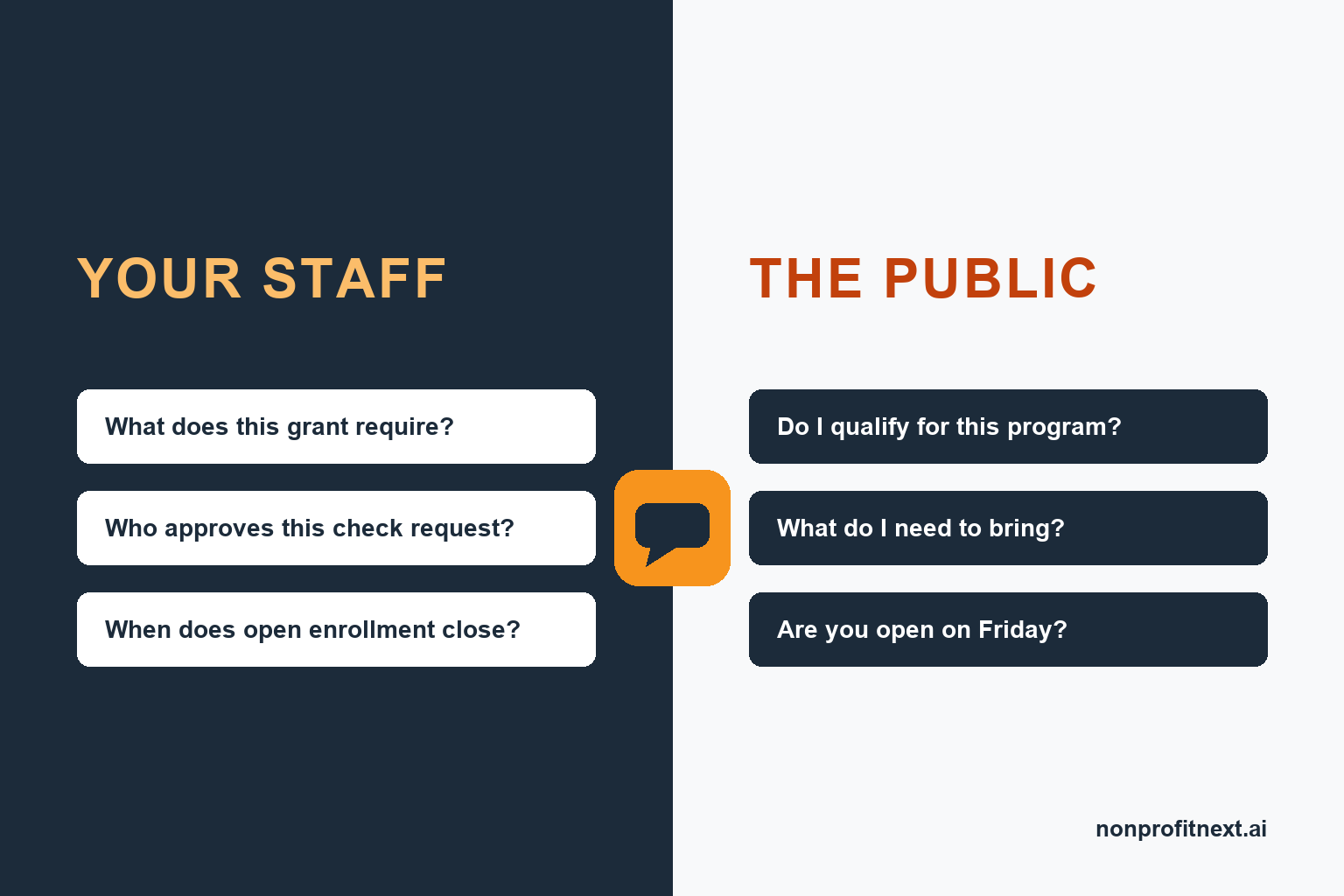
Your staff have a list of questions they ask each other and your management team all the time. What is the mileage rate this year. Who approves a check request over five hundred dollars. What does this grant require in the case file. When does open enrollment close. Which form do I use for a schedule change.
The public has its own list. Do I qualify. What do I need to bring. Are you open on Friday. Where do I park. Who do I talk to about my mother’s situation.
Both lists have the same shape. The answers already exist in writing somewhere, in a handbook, a policy binder, a grant agreement, or a resource directory. Nobody can find them quickly, so people ask a person instead, and that person stops what they were doing to answer.
What It Answers for Your Staff
The assistant can sit inside your organization, including SharePoint, Google, and other platforms, work from your own documents, and answer the questions staff currently bring to whoever has been on the team the longest. This increases productivity, reduces interruptions, and helps staff to easily access the information they need.
Agency wide questions. Policies and procedures, the approval chain for purchases and time off, the holiday schedule, which system to use for what, and who owns a given process. New staff can ask these without feeling like they are interrupting someone every hour or feeling lost.
Program specific questions. Program rules, service definitions, documentation standards, reporting requirements, and what a particular grant requires in the file. A staff member working across two funded programs has two sets of rules to keep straight, and the answer to “does this count under this grant” is usually written down somewhere.
Human resources and benefits questions. Paid time off accrual, enrollment windows, what the plan covers, how to change a withholding, where the form lives. These are the questions people are least comfortable asking out loud and most likely to get wrong, and they take real time from whoever handles HR.
The written material for all of these questions already exists in your grant agreements, handbook, your procedures, and your benefits summaries. The assistant makes it searchable in plain language, and it points to the person to talk to when a question needs judgment rather than a lookup.
The internal version is also the easier one to start with. There is no public interface to design, the audience is small enough to train in a meeting, and if the answers are wrong your staff will tell you immediately.
What It Answers for the Public
On the public side, think of it as a receptionist who is available at any hour and never gets pulled into a meeting.
Someone types a question in their own words. The assistant answers from your approved material and leads with eligibility rather than burying it. If a program has an income limit, a waitlist, or a residency requirement, the answer says so first. That saves the person a phone call that was never going to work out.
From there it handles the practical questions that usually take three exchanges. What documents to bring. What the intake appointment involves. Which office covers their county. What your hours are and whether you are closed for the holiday. How to reach a person if they would rather talk to one.
The assistant can also serve the public by functioning as an information and referral provider, working from the organization’s own referral directory, filtering to the visitor’s county, and returning matching services with phone numbers, hours, and eligibility requirements. When nothing matches, it says so, gives the office number, and logs the question.
Two things happen while it works. It counts what it was asked, by topic and by county, so the numbers your funders want are being built as you go instead of reconstructed at reporting time. And every question it could not answer is saved with its full text, which becomes a record of what people in your area need and cannot find.
What It Should Refuse to Do
A general purpose chatbot will answer anything, confidently, including things it has no basis for. That is the wrong tool to put in front of your staff or the people you serve.
Our assistant works only from the material you give it. When nothing in that material answers the question, it says it does not have the answer, offers the office phone number, and logs the question for staff. It does not search the open internet to fill a gap unless your organization decides it should.
Anything urgent goes to a person. A crisis, a safety concern, or an eligibility call that depends on circumstances the directory does not capture gets routed rather than answered. The same holds internally. The assistant can tell a staff member what the leave policy says; it should not be deciding whether a particular leave request is approved. That rule has a side benefit. A question the assistant could not answer shows up in your logs as a real gap, rather than being papered over with a plausible sentence.
Where Personal Information Goes
On the public side, the assistant does not ask a visitor for their name, an address, or a phone number, and it does not need any of them to answer a question about food or housing. If your funders require demographic reporting, the assistant can collect those details in a short form prior to the visitor interacting with the AI assistant, so their information stays private and secure. Your organization stores that data in its own system before the conversation starts, so those answers never pass through the AI.
The internal version has one more boundary. Staff questions can be sensitive, particularly the HR ones, so the assistant answers from policy documents rather than from personnel records. It has no access to anyone’s file. Further, the internal version is configured to keep all questions anonymous and access to such information limited to those who have administrative level access to the system.
Two protections sit behind both versions. The assistant runs under a commercial agreement with the AI provider that does not allow the provider to store what it receives or use it to train models. And the system runs on hosting your organization controls, with your organization’s own AI account, so no records belonging to your organization sit with us. Our data privacy and ownership page covers how we handle this across everything we build.
Accessibility is part of the build, not an addition to it. The assistant works with screen readers and assistive technology, meets the contrast requirements in the W3C’s accessibility guidelines, and does not use puzzles or image challenges to screen out automated abuse, because those challenges block real people first. I wrote about why that matters in what disability taught me about AI.
Where This Fits
The software platform is the same across different applications and organizations. What changes is the material it answers from and who it talks to.
Any organization with a handbook, program manual, and standard operating procedures. The internal configuration on its own. Policies, procedures, program rules, and benefits.
Workforce and housing programs. Internally, staff questions about what each funder requires in the file. Publicly, eligibility and document questions answered before intake, so people arrive with what they need.
Food bank or pantry network. A locator that handles “I need groceries this week and I do not drive,” working from your own list of sites and hours.
Aging services. A caregiver asks about respite care or rides to dialysis and gets the programs serving their county, with eligibility requirements clearly stated along with the details.
If your organization is not on that list, the test is whether your staff answer the same questions every day from material that already exists in writing. If they do, this fits.
What Your Organization Owns
The assistant runs on hosting you control, with your own AI account. There is no NonprofitNext subscription and no per user license, so the cost does not go up because you added staff or volunteers.
Your handbook, procedures, and directory stay where your staff already keep them, and an update takes effect when they save it. We build the assistant with your team, test it against the questions your staff actually get, and train them until it is theirs.
Pricing is published in our Investment Guide. The full description is on the AI Knowledge and Resource Assistant page, and the case study is in the case study.
Common Questions
What is an AI assistant for nonprofit staff questions? It is an assistant pointed at your own handbook, procedures, program rules, and benefits summaries, answering the questions staff currently bring to a colleague. It covers policy and approval questions, what a grant requires in the case file, and HR and benefits questions. It works from policy documents.
Can the same assistant answer questions from the public? Yes, pointed at a resource directory or program descriptions, it answers eligibility, documents, hours, and referral questions at any hour, and hands anything urgent to a staff member.
How is this different from a chatbot on a website? The difference is what it is allowed to say. A general purpose chatbot will produce an answer whether or not it has one. This assistant answers only from material your organization approved and says plainly when it does not have the answer. It was designed and built by people who have decades of experience in the sector who know where and how a tool like this can help.
How much of our own work does this take? The build work is mostly gathering documentation such as your handbook, procedures, or directory into usable shape, and testing the assistant against the questions your staff get. We work closely with your team to prepare that material, create the accounts you need, and train your team once the tool is ready.
If your staff spend a good part of every day answering the same questions, down the hall or on the phone with members of the public, this is the kind of thing that can give time back to your organization and the people you serve. I am glad to talk with you about how our assistant can benefit your organization. Book a short call with me at calendly.com/larry-nonprofitnext/30min.
Larry is the co-founder and Principal Innovation Strategist at NonprofitNext. Learn more at nonprofitnext.ai.