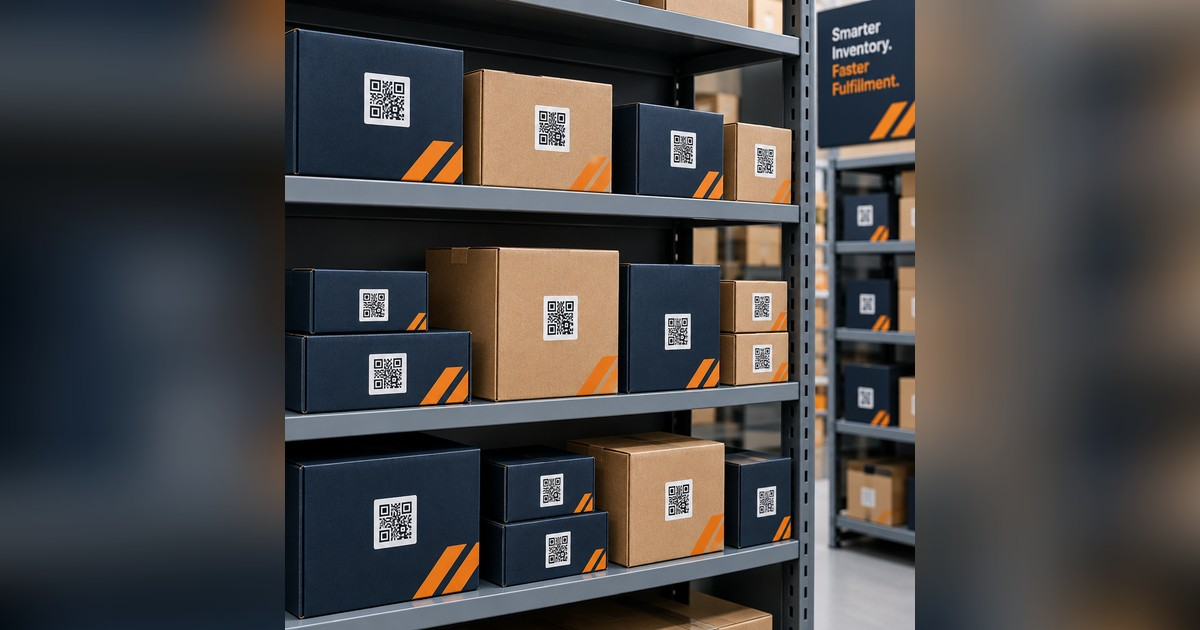
With QR code inventory tracking, your staff should be able to give a reliable answer when someone asks whether an item is available. They should not have to search three spreadsheets, walk through a storage room, or ask whether anyone remembers giving it away.
Our Zero Entry Inventory provides QR code inventory tracking for nonprofits using Google Forms, Google Sheets, and Google Apps Script. A staff member records an item on a customized Google Form when it arrives. The system creates the inventory record, assigns an asset ID, produces a QR code label, and sends the donor a receipt along with a copy to the finance department. When the item leaves, a staff member scans the label with a phone and records where it went.
QR code inventory tracking gives your organization an accurate inventory without asking staff to enter the same information again and again. There is no separate inventory app to install, no NonprofitNext subscription, and no outside database holding your records. The system runs in your organization’s own Google Workspace.
The Cost of an Inventory System Nobody Trusts
Most inventory problems do not begin with a bad spreadsheet. They begin with a process that depends on someone remembering to update it.
An item arrives during a busy afternoon. Someone puts it on a shelf and plans to enter it later. A staff member gives away a wheelchair but forgets to change its status. Two programs create separate copies of the inventory because neither team trusts the original. A donor receipt sits unfinished while more urgent work takes priority. Eventually, the spreadsheet says an item is available when the shelf is empty.
That can mean promising equipment to someone who needs it and then discovering that it is gone. It can mean rebuilding distribution totals when a grant report is due. It can mean asking staff to spend hours reconciling records that should have been accurate from the beginning.
This is not a staff performance problem. It is a workflow problem. If keeping an accurate record requires extra steps after the real work is finished, those steps will sometimes be missed. Zero Entry Inventory makes accurate recordkeeping part of the workflow, so staff do not have to remember a separate follow-up task.
QR Code Inventory Tracking Starts When an Item Arrives
When a donation or purchased item comes in, a staff member or volunteer opens a short Google Form on a phone or computer. The form is built around your program. It can capture the item type, condition, donor information, storage location, program assignment, or any other details your organization needs. Staff do not have to work around generic fields designed for another kind of organization. This is your program, your inventory, and your process.
Once the form is submitted, Zero Entry Inventory:
- Adds the item to the master inventory tracker.
- Assigns a unique asset ID.
- Creates a QR code label.
- Prepares the record for checkout, transfer, or return.
- Sends a receipt to the donor and a copy to your finance department for audit and tracking.
The information is entered once. The system completes the remaining steps.
One Scan When the Item Moves
When an item leaves the shelf, a staff member scans its QR code with a phone camera. The scan opens a short form where the staff member records what happened. Depending on the program, that might mean selecting the participant who received it, the site to which it was transferred, or the employee who checked it out. The inventory updates immediately.
Returns work the same way. When an item comes back, one scan can return it to available inventory and record its current condition. Transfers between programs or locations can also be handled through the label.
There is no separate scanner to buy and no special mobile app for staff or volunteers to learn. If someone can scan a QR code, they can use the system.
Accurate Answers for Staff and Leadership
The Zero Entry Inventory tool gives everyone one current source of information. Program staff can see whether an item is available before promising it to someone. A loan program can see which equipment is checked out and who has it. A warehouse or storage team can see where an item belongs. Leadership can review what came in, what went out, and how much each program distributed.
Reporting is easier because staff are not reconstructing activity from memory. If a funder asks how many laptops, beds, walkers, or household kits were distributed during the quarter, the answer is already in the system.
- Do we have one available?
- Where is it?
- Who received it?
- When did it leave?
- How many did we distribute?
- Did the donor receive a receipt?
Donor Receipts Without the Backlog
Donor receipts are important, but they are easy to delay. Staff often have to find the donation details, create a letter, check the wording, email it to the donor, and send a copy to finance. When the donation is recorded, Zero Entry Inventory completes those steps automatically. Your team does not have to do additional work to send the receipt.
The system creates a personalized receipt on your organization’s letterhead, emails it to the donor, and sends a copy to the appropriate person in your finance department. The receipt describes the donated property and its condition. Your organization does not assign a dollar value. The donor determines the value for tax purposes.
The donor receives a prompt acknowledgment, finance gets a consistent record, and staff do not inherit another administrative task. A timely receipt also sends an important message: your organization noticed the gift, handled it carefully, and has a reliable process for putting it to work.
Built for the Different Ways Nonprofits Handle Inventory
Zero Entry Inventory was first built for a Center for Independent Living in South Carolina that operates an assistive technology and donated equipment reuse program. Before the new system, conflicting spreadsheets made it difficult to know what equipment was available. After implementation, the team had a current inventory record instead of having to guess. Manual data entry dropped to near zero, and automatic receipts returned administrative time to the finance and development teams. You can read the full story in our inventory case study. The same approach can be adapted for many kinds of nonprofit programs.
Equipment Loan Programs
A loan closet can track wheelchairs, walkers, shower chairs, hospital beds, and other equipment from intake through checkout and return. When someone calls asking for a walker, staff can see whether one is available and where it is located. If an item comes back damaged, its condition can be recorded during the return.
Food Pantries
Large food banks may need warehouse software. Smaller pantries and distribution programs often need something simpler. Zero Entry Inventory can be a good fit for that need.
A volunteer can record a delivery from a church, business, or community food drive. The system can be customized to track weight, quantity, category, expiration date, storage location, or the details your program needs. A donor receipt can be sent before the volunteer leaves the loading area. As food or supplies move to a shelf, partner site, or distribution event, a scan records the activity. Monthly totals are available without rebuilding them from paper forms.
Schools, Libraries, and Youth Programs
Programs that lend laptops, hotspots, musical instruments, books, tools, or sports equipment can scan each item out and back in. Staff can see what is available, what is overdue, and who currently has each item. They can also record an item’s condition when it is returned.
Housing, Shelter, and Resettlement Programs
Furniture, household goods, appliances, and move-in kits can be tracked from donation to distribution. A case manager can check available inventory before telling a family that an item is ready. Leadership can report how many households received furnishings without collecting separate counts from each staff member.
Disaster Relief and Mutual Aid Programs
During a response, supplies may arrive and leave too quickly for item-by-item tracking. In that situation, a QR code can be attached to a pallet, kit, container, or shipment. Staff can record what arrived, where it was sent, and which site or household received it. That record can support reimbursement requests, funder reports, and planning for the next response.
The same system can work for arts organizations tracking costumes or instruments, animal shelters lending crates and supplies, thrift programs recording donations, and offices managing shared equipment. If physical items come into your organization and later move, leave, or return, Zero Entry Inventory can be configured around that process.
Why Not Use a Regular Inventory App?
For some organizations, an existing inventory application is the right answer. If it matches your workflow, provides the reports you need, and fits your budget, use it. NonprofitNext has no financial relationship with inventory software vendors and earns no commission from any product you choose.
Our Zero Entry Inventory solution is a better fit when your organization wants:
- A process designed around its actual programs
- Donor receipts built into intake
- Forms that staff and volunteers can use on their phones
- No separate scanning equipment
- No NonprofitNext software subscription
- Data stored in its own Google Workspace
- Reports based on the information its funders and leadership need
- Ownership of the complete system after the build is finished
Many commercial applications require organizations to adapt their work to the software. We build and customize the system around the work your staff already does.
Can You Build It Yourself?
Yes. A basic Google Form connected to a spreadsheet can help a small program replace a clipboard or an outdated inventory list. The difficult part is connecting the full process. The system must assign unique IDs, generate labels, connect each scan to the correct record, update item status, send receipts, manage returns, and produce useful reports. It also needs safeguards to prevent accidental duplication and incomplete records.
That is where many internal projects stop. The form works, but the rest of the process still depends on manual updates. Zero Entry Inventory provides a complete workflow, configured for your organization and tested before your staff begins using it.
What Runs the System
Zero Entry Inventory uses Google Forms, Google Sheets, and Google Apps Script. Google Apps Script is the automation tool included with Google Workspace. It creates asset IDs and labels, updates records, and sends receipts. You do not need Zapier or another paid connector to move information between the form, spreadsheet, and email.
We use AI tools during development when they help us build and test the automation. AI is not part of the daily inventory process. Once the system is running, no AI model needs to read your donor information, interpret scans, or decide what happens to an item. A form records the information, a script completes the assigned steps, and a phone camera reads the QR code.
Many organizations are encouraged to buy AI products for work that straightforward automation can handle at a lower cost and with fewer moving parts. Our guide to choosing AI tools without wasting money explains how to start with the task instead of the technology. For this task, Google Forms and a carefully built script are usually the better answer.
Your Organization Owns the System and the Data
Zero Entry Inventory runs in your organization’s Google Workspace. The forms, spreadsheets, scripts, donor records, and inventory data belong to your organization. Receipts are sent from your account. NonprofitNext does not maintain a separate copy of your inventory or donor information. When the build is complete, we hand over the entire system, and it continues running in your account. You can read more about this commitment on our data privacy and ownership page.
What You Need to Get Started
Your organization needs Google Workspace and a printer for QR code labels. Eligible nonprofits can receive Google Workspace through Google for Nonprofits at no cost. Google Workspace is preferable to a personal Gmail account because it supports organizational ownership, user management, and higher limits for automated email.
We begin by learning how items enter your organization, where they can go, what staff need to record, and what leadership needs to report. We then build the forms, inventory view, labels, receipts, and automation around that process. Your staff receives training before the system is handed over. Because the forms use familiar Google tools, most staff members and volunteers can begin using them with little instruction.
Zero Entry Inventory is a one-time build. There is no ongoing NonprofitNext subscription. If a future Google change affects the script, support is available from us or from any vendor you choose.
See Your Own Inventory Process in a Demonstration
The best way to decide whether Zero Entry Inventory fits your organization is to watch the complete process. During a demonstration, we can record a sample donation, create its label, scan it out with a phone, and show you the updated inventory. You will see what your staff would do and what leadership would be able to see.
You can schedule a call with me at a time that works for you. If you would rather begin with your current process, send the column headings from your inventory spreadsheet through our contact form. I will show you how those fields could become a simpler intake form. Pricing is available in our Investment Guide, and you can review the full product description on the Zero Entry Inventory page.
Common Questions
How does QR code inventory tracking with Google Forms work?
A staff member completes a short Google Form when an item arrives. Google Apps Script adds the item to a Google Sheet, assigns an asset ID, and creates a QR code label. When the item moves or leaves, a staff member scans the label with a phone and records what happened. The inventory updates immediately.
Will staff have to enter the same information more than once?
No. Item information is entered during intake. After that, staff use the QR code to record checkouts, transfers, and returns without searching for the item in a spreadsheet or retyping its details.
Do we need Zapier or another automation subscription?
No. The automation runs through Google Apps Script, which is included with Google Workspace.
Do we need special scanners?
No. Staff can scan the labels with a modern phone camera. There is no scanning app to install.
Can the system send donor receipts?
Yes. It can create a receipt on your organization’s letterhead, email it to the donor, and send a copy to finance when the intake form is submitted.
Where is our data stored?
The system and its records remain in your organization’s Google Workspace. NonprofitNext does not store a separate copy of your inventory or donor data.
Is Zero Entry Inventory a subscription?
No. It is a one-time build with no NonprofitNext software subscription. Support is available if a future Google change requires the script to be updated.
Can it be customized for our programs?
Yes. The intake fields, locations, item statuses, checkout choices, receipts, and reports are built around how your organization handles inventory.
Stop Guessing What Is on the Shelf
QR code inventory tracking should do more than hold a list. It should help staff serve people with confidence, acknowledge donors promptly, and give leadership reliable information without creating more administrative work. That is what Zero Entry Inventory is designed to do.
If your team is still retyping inventory, correcting outdated spreadsheets, or searching the building before answering a simple question, let me show you a better process. Schedule a call with me, or contact us with the column headings from your current spreadsheet. I will show you what Zero Entry Inventory could look like for your organization.
Larry Wanger is the cofounder and Principal Innovation Strategist at NonprofitNext. Learn more at nonprofitnext.ai.