Your first AI win: a simple, easy way for nonprofit leaders to start using artificial intelligence on a task they already do.
The executive director board report is one of the best places to start with AI. If you are curious about artificial intelligence but are not quite sure where to begin, start with the regular report you send to your nonprofit’s board of directors.
The board report is a familiar task, it needs to be done regularly, and it often takes more time than we would like. It is also a great opportunity to see how AI can help you work more efficiently without giving up your voice, your judgment, or your personal connection with the people who support your organization.
You do not need technical expertise, expensive software, or a complicated implementation plan. You need an AI assistant, a few notes about what is happening at your organization, and a willingness to experiment.
In this post: why the board report makes a good first AI task, choosing an AI assistant, gathering your notes, a board report template prompt you can copy, reviewing the draft, reusing it each time, and using the same process for other audiences.
Why Start With Your Executive Director Board Report?
If you have led a nonprofit, you know the routine. You sit down to write your report to the board. You think through recent accomplishments, review program activities, pull together a few numbers, identify upcoming events, and consider anything that needs the board’s attention. Then you have to turn all of that information into a useful, readable email.
Maybe it takes 20 minutes, or maybe it takes an hour. Sometimes it gets pushed to the bottom of your to-do list because something more urgent comes along. If you are anything like me, you may also have notes in three different places and random thoughts between reports that need to land in this email.
Now imagine being able to take a handful of notes, give them to an AI assistant, and receive a well-organized first draft in less than a minute. You still review it, you still make changes, and you still decide exactly what your board members receive. But instead of spending your time figuring out how to organize and write the message, you can focus on what matters most: the information, context, and leadership perspective you want to communicate. That kind of small, practical improvement is what makes AI worth exploring.
Step 1: Choose an AI Assistant
You do not need a specialized nonprofit AI platform to get started. Tools like ChatGPT, Claude, Microsoft Copilot, and Google Gemini can all help draft and organize written communications, and many offer free or included options that are enough for experimenting with a task like this.
If you are already using one of these tools, stick with it. If you are completely new to AI, choose one that seems approachable and start there. Our guide on how to choose AI tools for nonprofits covers what to look at before you pay for anything.
Before entering organizational information, take a moment to understand the tool’s privacy and data settings. For this first exercise, use information you are comfortable sharing under your organization’s policies, and leave out confidential personnel matters, identifiable client information, and other sensitive details. If your organization does not have an AI policy yet, our post on what your nonprofit AI use policy should cover is a good place to start.
Step 2: Gather Your Notes
You do not have to write complete sentences or prepare a polished report, because that is part of the work you are asking AI to help with. Start with a few bullets covering topics such as:
- Programs and services: what happened since your last report, including any significant accomplishments or developments.
- Fundraising: new gifts, campaign milestones, or upcoming opportunities.
- Operations: important staffing, administrative, or organizational updates appropriate for the board.
- Upcoming activities: events, meetings, or deadlines board members should know about.
- Board involvement: anything you need board members to do.
For example, the notes for a weekly report might look like this:
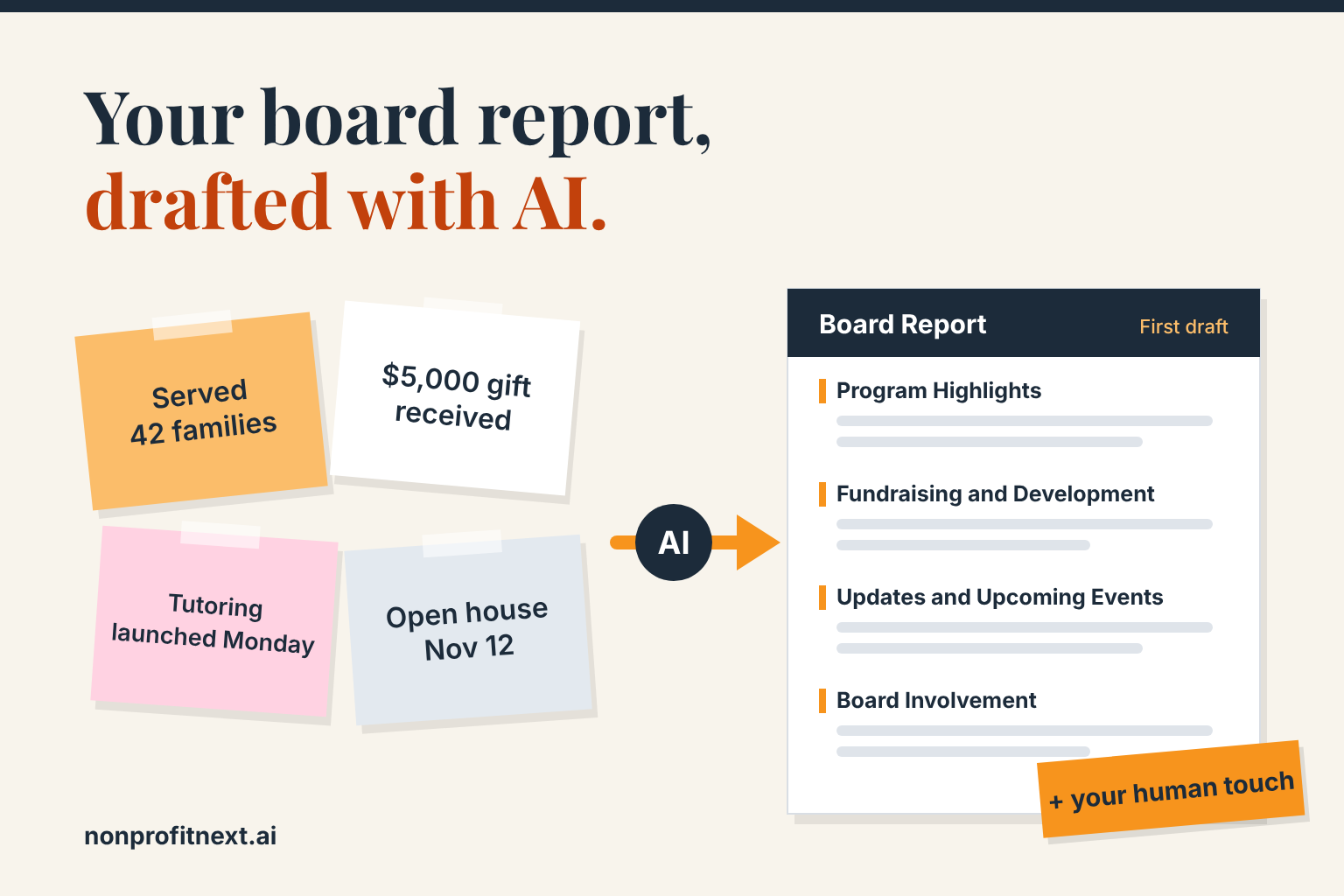
Programs: Served 42 families this week. Launched our new after-school tutoring program on Monday. Twelve students participated during the first week.
Fundraising: Received a $5,000 donation from a local business. Fall fundraising campaign has raised $18,500 toward a $30,000 goal.
Operations: Interviews for the program coordinator position begin next Tuesday.
Upcoming: Community open house on November 12.
Board request: Ask board members to share the open house invitation with their networks.
It may be helpful to keep an ongoing document of accomplishments and ideas for this report on your computer or in the notes app on your smart phone. This makes it easier to capture things you want to include in the report. Then, you can simply copy and paste these notes into your AI assistant when you are ready to put together a draft of the report.
Step 3: Give AI Clear Instructions
The quality of your instructions makes a real difference in what AI gives back. If you simply type “Write my board report,” you will probably get something generic. Instead, tell the AI assistant who the audience is, what you want to communicate, how you want it organized, and what tone you prefer. Here is a board report template prompt you can copy and use.
Board Report Template Prompt
Help me write my [weekly or monthly] executive director report for the board of directors of my nonprofit organization. It will be sent by email.
Use the notes I provide to create a professional, friendly, and concise report that keeps board members informed and engaged.
Organize the report into four sections:
- Program Highlights
- Fundraising and Development
- Organizational Updates and Upcoming Events
- Opportunities for Board Involvement
Keep the report conversational and easy to read. Use short paragraphs and bullet points where helpful. Include a brief greeting and a positive, natural closing.
Important: Use only the information I provide. Do not invent facts, numbers, accomplishments, or details. If something is unclear, ask me rather than making an assumption. Do not exaggerate our accomplishments or make the report sound like a marketing advertisement.
Here are my notes:
[Paste your notes here.]
Choose weekly or monthly, replace the bracketed notes with your own, and submit the prompt. Within moments, you should have a first draft to work with.
Step 4: Review, Personalize, and Send
I emphasize this step whenever I work with nonprofit leaders: AI creates the draft, and you remain responsible for the message.
Read through the report carefully. Check the facts and numbers, and make sure the message accurately reflects what is happening at your organization.
Pay particular attention to how the message sounds. Ask yourself whether it sounds like you, whether it carries the right level of enthusiasm or concern, and whether there is something your board needs to understand that is not obvious from the numbers.
This is the place to add a personal observation about a successful event, thank a board member for helping with a project, or explain why a particular development matters. Those personal touches come from your experience, your relationships, and your judgment, and they are what make the report meaningful to your board.
You can also ask the assistant to revise the draft. For example:
“Make this a little less formal.”
“Shorten the fundraising section.”
“Make the request for board participation clearer.”
“Rewrite the opening so it sounds more like a personal update from me.”
You do not have to accept the first version. Working with AI is often a conversation, and asking it to make adjustments is part of the process.
Step 5: Make Your Next Board Report Even Easier
Once you have created a report you like, save the prompt. You might keep it in a Word document, a note on your computer, or a project or saved instructions feature in your AI tool. The next time your report is due, you do not need to start over. Reuse your instructions, provide the new information, and ask the AI assistant to prepare the next report.
As you become more comfortable, you can improve the instructions. Perhaps you prefer shorter reports. Maybe you want fundraising information presented in a particular way, or you always want a section on upcoming events. You can even provide a previous report you have written, with confidential information removed, and ask the assistant to use its tone and structure as a guide.
Over time, you will develop a repeatable process that produces increasingly useful drafts. A task that previously required 30 or 45 minutes might take only 10 or 15 minutes, depending on the complexity of your report and how much editing it needs. Multiply those savings across an entire year, and a relatively small improvement can give you meaningful time back.
Don’t Stop With Your Board of Directors
Once you have learned how to use AI to prepare your executive director board report, you have also developed a process you can apply to other communications. The underlying approach is the same: gather the information, identify the audience, give AI clear instructions, and review the result. What changes is how you communicate.
For donors: You might use the same program accomplishments to create a short update showing how their support is making a difference. Emphasize impact, express appreciation, and help donors understand what their contributions make possible. Our post on using AI for donor communications goes further on this.
For volunteers: You could prepare a regular message celebrating volunteer accomplishments, announcing upcoming opportunities, and thanking people for their time.
For staff: You might turn your notes into an internal update highlighting organizational priorities, upcoming deadlines, and team accomplishments.
For community partners: You could create a brief message about new programs, collaboration opportunities, or developments that affect the people you serve.
You can even ask AI to take one set of approved, nonconfidential notes and draft several different messages, each written for a different audience. For example:
“Using these same notes, create a shorter version for our volunteers. Focus on program accomplishments, thank them for their contributions, and highlight the upcoming community open house. Leave out internal staffing information and financial details.”
One set of notes can become several messages, each written for the people receiving it. That is especially useful for smaller nonprofits where one person may be responsible for programs, fundraising, operations, and communications. If that describes your organization, our post on AI for small nonprofits has more ideas.
Keep in mind that each audience should receive only the information appropriate for them. A donor update, for example, should not automatically include everything shared with the board.
The Bigger Lesson: Start With Something You Already Do
When nonprofit leaders first explore AI, there is often pressure to think big: building a chatbot, automating the intake process, analyzing the donor database, or developing an organization-wide AI strategy. Those may all be worthwhile opportunities, but they do not have to be your starting point.
I encourage leaders to begin with something much simpler: a task you already do regularly, that takes time but follows a fairly predictable process, and where a useful first draft or an organized starting point would make your work easier. The executive director board report fits that description particularly well.
It is easy to understand, and you can try it without changing how your organization operates. You do not have to connect AI to your databases or give it access to confidential records, and you can evaluate the result immediately.
Just as importantly, the exercise teaches you several foundational AI skills: writing effective instructions, providing useful context, evaluating AI-generated information, and refining a result through conversation. Those skills transfer to almost every other practical use of AI. If you are looking for more ideas, explore our guide to AI use cases for nonprofits.
A Few Things to Keep in Mind
First, do not expect perfection. AI can misunderstand your notes, misstate details, or produce language that feels a little unnatural. That is why you review the draft. When you spot a recurring problem, adjust your instructions.
Second, protect your organization’s information. Even a routine board report may contain sensitive financial, personnel, or client information. Use only information appropriate for the AI service and your organization’s data policies. If you are unsure, start with publicly shareable information or fictional examples. Our article on questions to ask before connecting AI to client data offers additional guidance.
Third, do not measure success by how much AI you use. Measure it by whether you are getting something valuable in return and if it is making you more productive. If a task becomes easier, the work improves, or you get more time to focus on your mission, that is a worthwhile outcome. This is the same order behind People First AI: your mission and your people come first, and the tool comes last.
Your First AI Win Is Closer Than You Think
You do not need to become an AI expert, find a grant, or launch an organization-wide initiative before you write your first AI-assisted board report. Start with the notes you already have and use the prompt in this article. See what comes back, make it your own, and try it again the next time your report is due.
Small, practical successes are often the best way to build the confidence to explore what AI can do for your organization. For a nonprofit leader juggling too many responsibilities and too few hours, getting even a little time back is a pretty good place to start.
Want help finding the right first AI task for your organization? Connect with NonprofitNext. Schedule a call with me at calendly.com/larry-nonprofitnext/30min.
Larry is the co-founder and Principal Innovation Strategist at NonprofitNext. Learn more at nonprofitnext.ai.