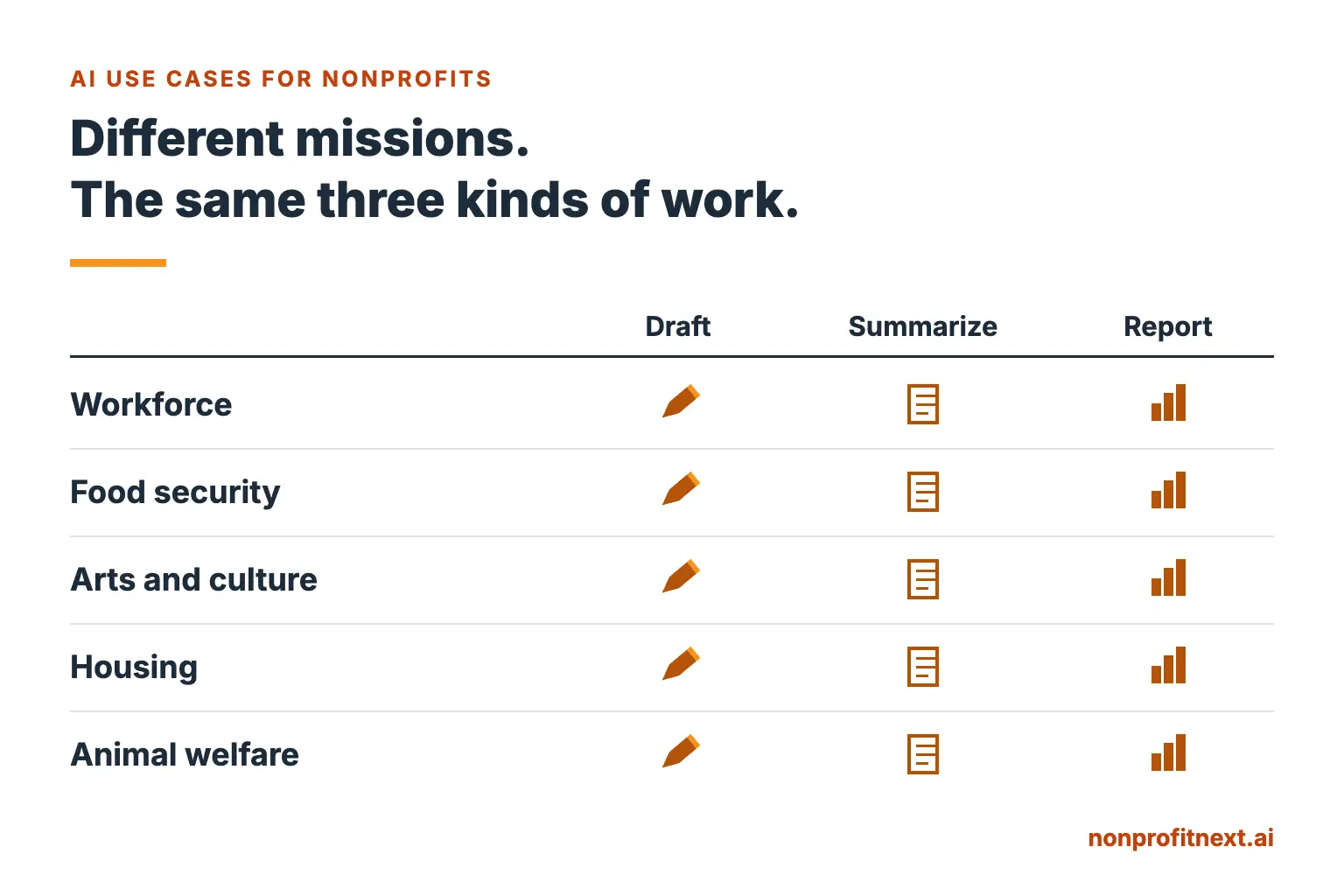
The most helpful AI use cases for nonprofits tend to fall into three broad categories of work:
- Drafting something you have written before
- Summarizing something you do not have time to fully absorb
- Turning information or data into a report people can understand
That pattern holds whether you lead a workforce program, food pantry, theater, housing organization, environmental nonprofit, or animal shelter.
What changes from one organization to another is not necessarily the technology. It is the work consuming your staff’s time.
For one organization, the biggest burden may be writing dozens of similar emails every week. For another, it may be reviewing lengthy policies and regulations. For another, it may be turning program data into a quarterly report for the board or a funder.
Once you learn to recognize these categories, finding useful applications for AI becomes much easier. Instead of asking what AI can do for your organization, you can ask a much more practical question: what work are we already doing that AI could help us complete more efficiently.
That is especially important for smaller nonprofits. You do not need an IT department, an AI strategy committee, or a large technology budget to begin experimenting. You need a well-defined task, clear boundaries, and someone responsible for reviewing the result.
In this post: the three kinds of work, what each one looks like across five fields of work in the nonprofit sector, a walk-through of the report you rewrite every quarter, where I draw the line, where to start, and the questions I hear most.
The Three Kinds of Work Behind Most AI Use Cases for Nonprofits
Drafting
Drafting includes work you have already done before, just in a slightly different form.
Think about:
- follow-up emails
- appointment reminders
- thank-you letters
- volunteer announcements
- program descriptions
- meeting agendas
- eligibility explanations
- board updates
- routine donor communications
Most of these are not truly blank-page writing assignments. You are often creating the twentieth or fortieth version of something your organization has written many times before. You already know what needs to be communicated. The challenge is finding the time to write it clearly again.
That is an area where an AI assistant can be useful. You provide the purpose, facts, audience, examples, and boundaries. The AI produces a first draft. A staff member reviews it, corrects it, adds the organizational knowledge the tool does not have, and decides whether it is ready to use.
People stay responsible for the communication. What gets lighter is the administrative work required to produce it.
Summarizing
Nonprofit leaders are surrounded by information. A new government guidance document arrives. A foundation changes its grant requirements. A committee meeting runs for two hours. Someone sends you a 40-page policy document the afternoon before a meeting.
You may need the substance of that information without having an hour available to read every page before you can begin thinking about it.
AI can help create a first-pass summary. For example, you might ask it to identify:
- major changes
- deadlines
- requirements affecting your organization
- questions that still need to be answered
- sections requiring closer human review
That last point is important. A summary is a starting point, not a substitute for a person reading the source when the details matter. If a regulation, contract, grant requirement, personnel issue, or compliance obligation depends on the precise language of a document, someone still needs to verify the original.
The value is triage. AI can help you determine where to focus your attention.
Reporting
Most nonprofits already have plenty of information. The harder part is turning it into something another person can quickly understand.
You may have:
- service numbers
- attendance totals
- placement rates
- survey results
- volunteer hours
- fundraising data
- program outcomes
- quarterly spreadsheets
Then someone has to convert those numbers into a narrative for the board, a funder, leadership, or the community.
AI can help bridge that gap. Give it clean, verified data and clear instructions about the audience and purpose, and it can produce a first draft explaining what the numbers mean.
Your staff still determines whether that interpretation is accurate. The spreadsheet may tell you participation increased 18 percent. It does not automatically tell you why. AI does not know that your outreach coordinator developed a new partnership, a major employer closed, a hurricane disrupted services, or your program changed eligibility criteria.
Those conclusions require organizational knowledge. AI can draft the narrative, and your people supply the meaning.
Workforce and Employment Programs
For workforce and employment organizations, drafting may produce the fastest return. Staff repeatedly write participant follow-ups, employer introductions, appointment reminders, workshop announcements, and explanations of program requirements. AI can help create those first drafts from approved templates and instructions.
Reporting is another obvious opportunity. Placement numbers, retention rates, employer engagement, training completions, and other outcomes often need to become a narrative for funders or leadership.
The important distinction is between the relationship and the administrative work surrounding it.
AI should not decide whether someone is employable, appropriate for a program, or deserving of an opportunity. Those decisions belong to people.
It can reduce the time staff spend producing the paperwork and routine communication surrounding those relationships.
Food Security
For food banks and food pantries, reporting can quickly become a burden. Distribution numbers accumulate constantly: pounds of food, households served, individuals served, volunteer hours, geographic reach, repeat visits, and other measures.
The numbers may already exist. The time-consuming part is explaining them.
AI can help turn verified data into a first draft of a monthly report, board update, grant narrative, or community impact summary.
Drafting is another common opportunity. Organizations repeatedly communicate:
- distribution schedules
- volunteer instructions
- donation guidelines
- weather-related changes
- eligibility information
- answers to common logistics questions
If staff members are answering the same question 50 times a month, that is a signal.
Write the answer carefully once. Establish an approved version. Then use AI to help adapt it to different audiences and situations.
Arts and Culture
For arts organizations, drafting often dominates. There are grant narratives, patron communications, donor messages, program descriptions, event announcements, board materials, press information, and season promotions. AI can help produce first drafts of that administrative content.
The same principle applies to reporting. Ticket sales, attendance, memberships, donations, educational participation, and audience data often need to be turned into something a board member can understand in five minutes.
What AI should not replace is the organization’s artistic judgment. The creative vision, interpretation, programming choices, and relationship with the community belong to the people running the organization. AI can shorten the administrative tail that follows the creative work.
Housing and Homeless Services
Housing and homeless-service organizations face a different pressure: the volume of information staff must process.
Policies change. Funding requirements change. Eligibility documents can be lengthy. Staff may also be working through large amounts of case documentation and program information.
Summarization can therefore be particularly valuable. AI can help staff create an initial summary of a lengthy public policy document or identify sections likely to affect a specific program.
Drafting can also reduce repetitive work. Staff frequently explain program processes, documentation requirements, appointments, next steps, and service options.
The boundary here needs to be especially clear. AI should not independently determine whether someone qualifies for housing, services, benefits, or assistance. It should not assess someone’s safety or make decisions that affect their rights or access to services. Those are human responsibilities.
Use AI to reduce administrative friction around the work. Do not use it to hand consequential decisions to the tool.
Environmental and Animal Welfare
For environmental and conservation organizations, summarizing content may be especially useful. Staff may regularly encounter lengthy permit filings, environmental reports, research papers, government notices, proposed regulations, and technical documents.
AI can provide a first-pass overview before a meeting or help identify sections requiring closer examination.
Animal welfare organizations may find more immediate value in drafting. For example, staff can turn a few factual notes about an animal into the first draft of an adoption profile, volunteer update, or routine communication.
The same boundary applies in both fields. AI can help communicate the science, advocacy, or care. It should not replace the expertise behind it.
A Walk-Through: The Report You Rewrite Every Quarter
One task appears in almost every nonprofit field: the recurring report. Suppose you produce essentially the same quarterly program report every three months. Here is a practical way to use AI to reduce that workload.
Step 1: Gather Good Examples
Start with two or three previous reports that accurately represent how your organization communicates.
These give the AI useful examples of:
- structure
- terminology
- tone
- level of detail
- typical section headings
- the information your audience expects
Do not simply choose the most recent reports. Choose the reports that you think best highlight your work. AI will reproduce weaknesses just as readily as strengths.
Step 2: Prepare This Quarter’s Information
Gather the verified information the report needs. That might include program totals, outcomes, important developments, unusual circumstances, challenges, successes, or changes from the previous quarter.
Remove information that should not be entered into the AI system you are using.
Then tell the AI what you want. For example:
Using the structure and tone of these previous reports, draft this quarter’s program narrative using the information below. Do not invent explanations for changes in the data. Flag anything that requires additional information from me.
That final instruction matters. You want the system to identify gaps rather than quietly fill them with plausible-sounding guesses.
Step 3: Review the Draft Like an Editor
Do not ask whether the draft sounds good. Ask whether it is correct.
Check the numbers for accuracy. Check whether it invented any facts, exaggerated a result, or misunderstood the program. Check whether it used your organization’s terminology correctly. Check whether it made a causal claim the data does not support. Then check for anything important that is missing.
The first draft may save substantial writing time, and accountability for the final report still belongs to your organization.
Step 4: Improve the Instructions
Pay attention to what you repeatedly change. Perhaps the AI keeps calling participants “clients” when your organization uses “members.” Perhaps it writes three paragraphs about activity totals when your funder cares most about outcomes. Perhaps its language is too promotional.
Those corrections should not disappear after you finish the report. Add them to your instructions.
Over time, you are building a repeatable process rather than starting from scratch every quarter.
Step 5: Repeat the Process
Three months later, use the improved instructions again. The process should become faster because you now have better examples, better directions, and a clearer sense of where human judgment is required.
That is one of the most practical ways to think about AI adoption. You are improving one workflow at a time rather than automating your organization overnight.
Where I Draw the Line
The examples in this article are administrative on purpose. AI can draft, organize, summarize, compare, and reformat information remarkably quickly. What it does not have is responsibility for your mission.
It does not know the people your organization serves. It does not understand your community in the way your staff does. It cannot build trust with a participant, understand why a donor has supported your organization for 20 years, or appreciate the history behind a difficult board decision.
It also should not be given authority simply because it can generate a confident answer.
I use a simple order when thinking about AI in nonprofits: mission first, staff second, the people you serve third, and the tool last. The technology and AI should support the first three, not rearrange them. I explain that framework more fully in why the tool comes last.
That order is also why I recommend beginning with drafting, summarizing, and reporting rather than with high-stakes decisions involving the people your organization serves.
Information is the other boundary to hold. Do not assume that every AI tool is an appropriate place for confidential, personally identifiable, personnel, health, donor, or client information. Your organization should understand the tool’s privacy terms, data-retention practices, account settings, and applicable organizational policies before sensitive information is entered.
When in doubt, work with de-identified information and add sensitive details later inside the systems your organization already uses for that purpose.
Where to Start
Do not begin by developing a list of 50 things AI might someday do for your organization. Find one task. Look back over the last two weeks and identify the repetitive administrative task that took more of your time than it should have.
Then determine whether it is primarily:
- drafting
- summarizing
- reporting
Choose one AI tool, establish appropriate information boundaries, test it on that task, and review the result carefully.
If it saves time without sacrificing accuracy, judgment, privacy, or quality, you have found a legitimate use case. Then find the second one.
That is a much more durable approach to AI adoption than chasing every new tool that appears or trying to change everything at once.
If you lead a very small organization, my article on AI for small nonprofits provides a five-step way to begin without adding a major technology budget.
Common Questions
Is AI only useful for large or technology-focused nonprofits?
No. Many of the most practical uses require little technical expertise. Small organizations may find the time savings particularly valuable because repetitive administrative work consumes a larger share of limited staff capacity. The key is to start with a specific task rather than trying to implement AI across the entire organization.
What is the first thing a small nonprofit should try?
Start with repetitive writing. Choose something your organization creates frequently: a weekly update, meeting summary, recurring reminder, volunteer announcement, or thank-you message. Give the AI clear instructions and examples, produce a first draft, and review everything before using it.
How do we use AI without risking the people we serve?
Begin with information, not technology. Determine what information is appropriate to enter into the system you are using, and avoid placing identifying or sensitive information into tools your organization has not evaluated and approved for that purpose. For many early uses, you can work with generalized or de-identified information and add sensitive details later within your organization’s established systems. Do not give AI authority over consequential decisions involving eligibility, safety, care, employment, benefits, or access to services.
Do different kinds of nonprofits need different AI tools?
Not necessarily. A workforce organization and an animal shelter may have completely different missions while still using the same general-purpose AI assistant. What changes is the task. The workforce organization may use it to draft employer communications, the animal shelter to create first drafts of adoption profiles, an arts organization for grant narratives, and a housing organization to summarize a lengthy policy document. Specialized software may eventually make sense, and it should earn its place by solving a real problem better than the general tools you already have. My article on how to choose AI tools for nonprofits explains what to evaluate before spending money on another platform.
Not sure which of these three kinds of work is consuming the most time in your organization? That is often the best place to begin. We can spend an hour looking at the work your team already does and identifying where AI may be useful and where it may not. No jargon, no sales pitch for the latest AI tool, just your organization’s work, your questions, and practical answers. Schedule a conversation with me at calendly.com/larry-nonprofitnext/30min.
Larry is the co-founder and Principal Innovation Strategist at NonprofitNext. Learn more at nonprofitnext.ai.