Most nonprofit leaders do not lack information about their organization. The problem is organizing the information they already have into a clear, concise picture.
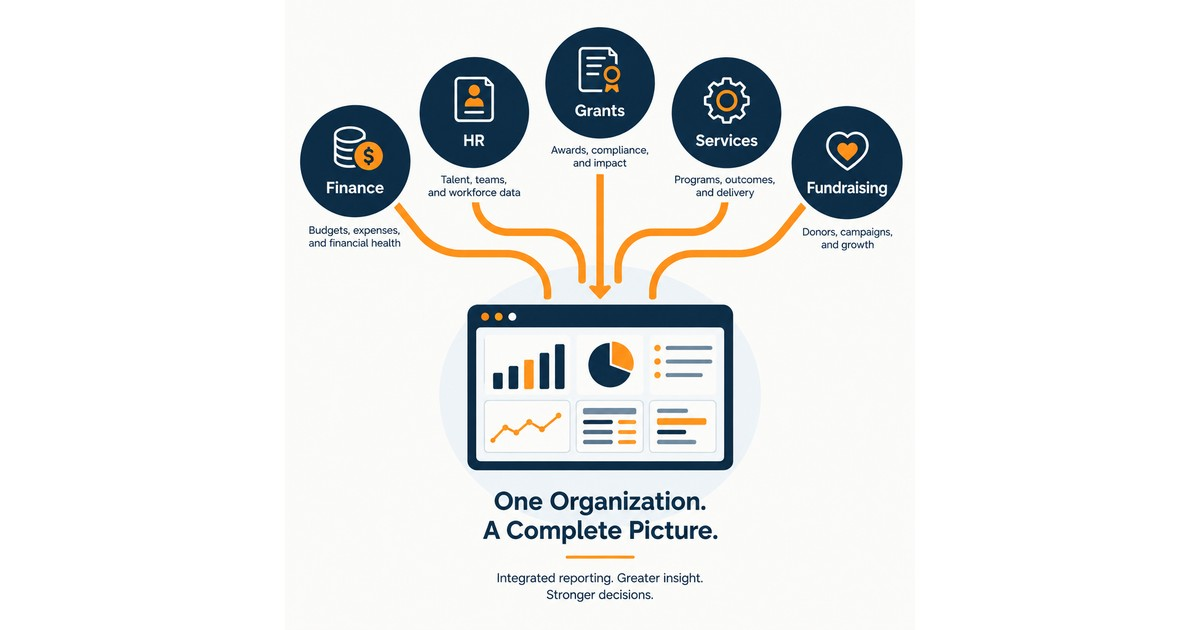
Financial numbers are in the accounting system. Donor information is in the CRM. Program and service results may be in a spreadsheet or case management system. Human resources information lives somewhere else. Grant requirements and reporting dates may be buried in award letters, calendars, and email. The information is there, but it lives in separate places.
That means someone has to pull reports from several systems, combine them, decide what matters, and turn everything into something leadership and the board can use. Executive360 was built to make that process much easier.
Once your organization's reports are brought together, Executive360 gives leadership one place to see finances, programs, grants, staffing, fundraising, trends, and upcoming concerns. More importantly, it shows how those areas affect one another.
What Nonprofit Data Silos Cost Your Organization
The first cost is staff time.
Every month, someone exports reports, moves numbers between spreadsheets, checks calculations, and tries to assemble a complete picture of the organization. In many nonprofits, that work falls to senior staff or even the executive director. By the time everything is assembled, the information may already be several weeks old.
The bigger problem is that separate reports tell only part of the story. Your financial report might look healthy while a grant report shows that a major award is significantly underspent. Those two pieces of information belong together because an underspent grant could eventually mean returning money to the funder. Program numbers might look strong while staffing data shows that two positions have been vacant for four months. That raises a different question: Are employees maintaining those results by carrying workloads that are not sustainable?
Fundraising might be ahead of last year, but that increase could be coming from one unusually large gift that is unlikely to repeat.
None of this information is difficult to understand. The difficulty is seeing it together across the systems many organizations already use. That is what Executive360 does.
What You See in Executive360
Once a month, a staff member uploads the reports your organization already produces. These might include:
- Financial reports
- Staffing information
- Fundraising reports
- Grant reports
- Program and mission data
Executive360 reads the files and shows the staff member what it found. Nothing is added until a person reviews and confirms the information. After the initial setup, the monthly process takes only a few minutes.
The result is one clear picture of the organization. Leadership can see days of cash on hand compared with a set target. Budget-versus-actual results show meaningful variances. Program results can be compared with annual goals and individual grant requirements. Vacancies are shown along with how long positions have remained open. Fundraising results can be viewed for the current month and year to date. Instead of receiving separate reports from finance, development, programs, and human resources, leadership can see how the pieces fit together. That makes the dashboard useful for executive staff and board members who need a broad understanding of the organization without digging through several reports.
Make the Dashboard Fit Your Mission
Every Executive360 installation includes core areas for financial information, staffing, fundraising, grant management, trends, and reporting. The program measures are configured around your organization.
For a food bank or pantry network, Executive360 might track pounds of food distributed and households served, then compare those numbers with the goals attached to individual grants.
For a workforce development organization, it might track enrollments, credentials earned, job placements, and retention. Those results can be connected to the grants that funded them rather than simply reported as organization-wide totals.
For a housing or shelter organization, the dashboard might include individuals or families housed, assistance dollars distributed, occupancy, and placements alongside the spending pace of the grants supporting those services.
For a Center for Independent Living, it can track consumers served, goals set and achieved, services delivered, and federal reporting measures in the format the organization already uses for reporting. No matter what your mission is, the underlying problem is common across the nonprofit sector.
If your leadership team spends time every month pulling information from several systems to understand how the organization is doing, Executive360 is designed for you. Its program section is configured around the measures that matter to your mission, funders, leadership team, and board.
Put Every Grant in One Place
Grant management is one of the areas where nonprofit data silos cause the most problems. An organization might have a federal grant, a state contract, a local government award, and several foundation grants. Each may be tracked differently by different people in different files or databases. Executive360 puts those grants into one consistent view. The app can read grant deliverables and reporting deadlines directly from award letters, then staff can confirm the information. Instead of relying on one person's calendar or inbox to track these important details, leadership can see upcoming deadlines from every funding source, clearly highlighted in the dashboard.
Executive360 also tracks how quickly each grant is being spent. A grant should be evaluated according to its own funding period, not just your organization's fiscal year. If a 12-month grant is halfway through its term but only 25 percent of the funding has been spent, leadership should know that. Identifying that problem in month four creates options. You may be able to hire staff, expand activities, adjust implementation, or talk with the funder. Finding it in month ten may leave very few options.
See Where Things Are Headed
Executive360 does more than summarize what has already happened. It also looks at trends in your organization's own data. For example, leadership can see a projection of the organization's cash position if the current trend continues. Instead of only knowing how many days of cash are available today, you can see what that number may look like several months from now.
The dashboard can also show projected revenue for the next fiscal year based on current information about committed grants. That can help answer questions such as whether the organization can afford to fill a vacant position.
Grant deadlines from different funders appear together so staff can see what is coming instead of discovering deadlines one at a time.
Executive360 also identifies issues that deserve attention and ranks them by severity. Each issue includes the numbers behind it, along with a suggested next step and the person responsible. Those suggestions are drafts. You decide whether to accept them, change them, or ignore them. The purpose is not to predict the future. Executive360 looks at patterns already present in your reports and makes them easier to see while there is still time to respond. A variance that has grown steadily for three months may deserve more attention than one unusual result from a single month. That kind of pattern can be easy to miss when each report is reviewed separately.
Create a Monthly Executive Brief
The same information used in the dashboard can also produce a monthly executive brief. The brief summarizes the organization's current position in plain language and can be shared with leadership or the board. Every statement is tied to the source report and reporting period it came from. You decide which elements of the dashboard are shared with your leadership team and board.
AI can help produce the language in the brief, but your organization provides the facts and decides what is appropriate to share. That follows the same approach I discussed in what People-First AI means for your board: technology can help organize and explain information, but people remain responsible for decisions and judgment.
After looking at Executive360, Keith Miller, Executive Director of Communities Living Actively and Free, a Los Angeles nonprofit, told us that a tool like this "makes reporting to our funders easier" and "helps direct staff who provide services maintain proper documentation as required by our federal and state funders."
Keep Sensitive Records on Your Own System
Bringing organizational information together should not require sending individual client, employee, or donor records to an AI provider. Executive360 sends totals, trends, and summaries to the AI. Individual records stay on your organization's computer. The files are read on your machine, and only the monthly totals needed by the dashboard are sent to the AI.
The system also includes additional safeguards. Executive360 runs on a server controlled by your organization rather than NonprofitNext. Accounts use a password and an authenticator code. An audit log records changes. Backups are encrypted and created nightly. The AI provider is used under a commercial agreement that does not allow information it receives to be used for model training. We also work with you to get business associate agreements signed.
Just as important, your organization owns the system. It runs on hosting you control and uses your own AI account. Your organizational records do not sit with NonprofitNext. Our data privacy and ownership page explains this approach in more detail.
Accessible by Design
A tool like this is not useful if part of your team cannot use it. Every chart in Executive360 includes a plain-language summary and a complete data table. That means someone using a screen reader can get the same information as someone looking at the chart. It also helps people who simply prefer reading numbers to interpreting graphs.
There is no separate software to install. Executive360 runs in a web browser.
Your Organization Owns It
Executive360 is available now. There is no ongoing NonprofitNext software subscription or long-term contract. Your organization owns the system, with the option to purchase upgrades and new features in the future if you wish.
Pricing is available in our Investment Guide. You can also see additional details and screens from the demonstration system on the Executive360 page.
Common Questions
How do you fix nonprofit data silos without replacing your existing systems?
You do not need to replace them. Your accounting system can remain your financial system. Your CRM can remain your fundraising system. Your case management system can remain your program system. Executive360 uses the reports those systems already produce and brings the important information together in one place each month. You keep the tools your staff already knows. What changes is your ability to see information from those tools together.
What can a consolidated view show that separate reports cannot?
It can show the relationships between the numbers. An underspent grant can be viewed alongside staffing vacancies. Strong program results can be considered alongside employee workload. A fundraising increase can be examined to determine whether it reflects broad growth or one unusually large gift. Executive360 also makes longer-term patterns easier to see, including cash trends, revenue already committed for the next fiscal year, grant spending rates, and upcoming reporting deadlines.
Do we need perfectly clean data before we start?
No. Bringing reports together may expose differences between systems that were difficult to see before, and that can be useful. Once you know where two reports disagree, you can determine why and correct the underlying problem. If your organization's reports require significant cleanup before they can be used together, that work can be scoped separately before the Executive360 implementation. Pricing is available in the Investment Guide.
Is Executive360 only for large nonprofits?
No. Smaller organizations may have an even stronger reason to consolidate their reporting because they have fewer people available to do the work. In a small nonprofit, the person spending several hours assembling monthly reports may be the executive director. Executive360 gives that time back and gives leadership better information.
If your leadership team is still building a picture of the organization from separate reports every month, Executive360 offers a simpler approach. Keep the systems you already use. Keep control of your data. Bring the information together in one place so leadership can spend less time assembling reports and more time deciding what to do next. If you would like to see how Executive360 could work with your organization's existing reports, schedule a call with me at calendly.com/larry-nonprofitnext/30min.
Larry is the co-founder and Principal Innovation Strategist at NonprofitNext. Learn more at nonprofitnext.ai.