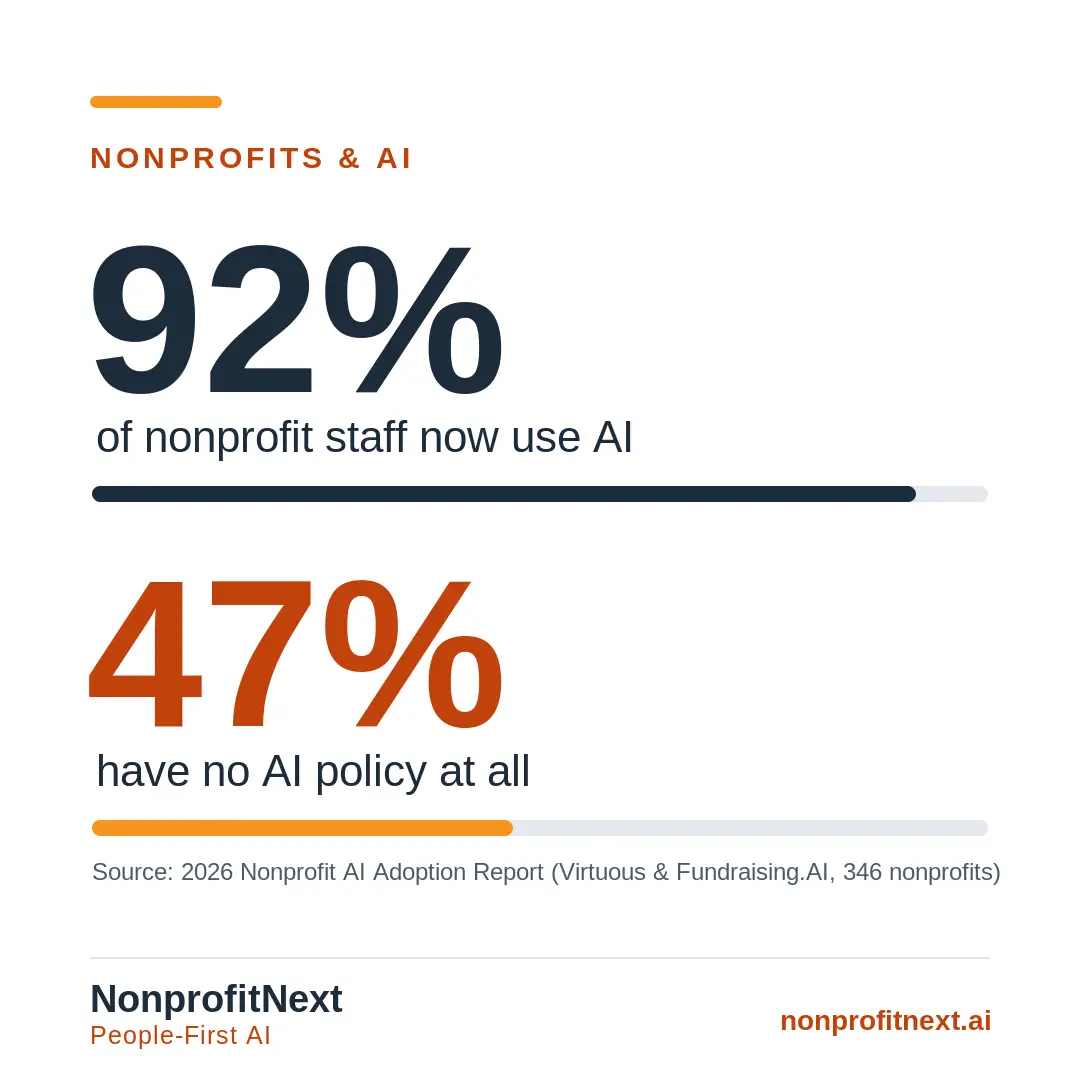
Your staff are already using AI. The 2026 Nonprofit AI Adoption Report, a survey of 346 nonprofits from Virtuous and Fundraising.AI, found that 92 percent of nonprofits now use AI in some form. The same report found that nearly half have no policy governing that use at all, a gap I wrote about in an earlier post on the missing nonprofit AI policy.
That gap is the whole reason for this post. The AI tools showed up in your organization a while ago. The rules did not show up with them.
Most AI policy advice you will find online is either a long template written for a company with a legal department, or a governance framework that assumes staff and time you do not have. This guide is built for the opposite situation: an AI policy for nonprofits that a small team can write and follow. A good nonprofit AI policy is short, written with the people who will live with it, and complete enough to start protecting your organization the same afternoon you write it. Its job is to keep the people you serve safe and to let your staff use AI without second-guessing every click.
Think of this as trading a hundred small guesses for a handful of decisions you make once, on purpose. Your policy does not need to be long, and it does not need a single technical term to make it stick.
In this post: what a nonprofit AI policy is, why your organization needs one, what a good policy covers, how to write your first one in an afternoon, what a policy cannot do, the questions leaders ask most, and where to get help.
What a Nonprofit AI Policy Is
A nonprofit AI policy is a short, written set of rules for how your staff and volunteers may use artificial intelligence in their work. It says which tools they may use, what information may and may not go into those tools, when to tell people AI was involved, and who to ask when a situation is not covered. That is the whole of it. An AI policy for nonprofits does not need legal language or a technical appendix to do its job.
Why Your Nonprofit Needs an AI Policy
The best reason to have a policy is already happening inside your workplace. Your staff are using these tools whether or not leadership has weighed in, and without a policy each of them is inventing their own rules on the fly. Some of those rules are fine. Some are not, and you will not know which until something goes wrong. A policy replaces guesses with one shared understanding.
The second reason is the people you serve. The free version of many AI tools keeps whatever you type and uses it to train the model behind it. A case note or a client’s details dropped into one of those does not stay private. For an organization whose work depends on people trusting you with their hardest moments, getting this right is important.
The third reason is from outside of your organization. Funders, donors, and partners have started asking whether AI played a role in your applications, your reports, and your communications. A written policy is the difference between answering that question calmly and scrambling to figure out the answer.
What a Good Nonprofit AI Policy Covers
No single template fits every organization. What a hospital system needs and what a five-person community group needs look nothing alike. So rather than hand you fill-in-the-blank language, here are the questions to work through so the policy that comes out actually reflects your mission and your values. I go section by section in what your nonprofit AI use policy should actually cover.
Which tools are allowed
AI now shows up as writing assistants, chatbots, image generators, data platforms, and features quietly added to software you already pay for. Your policy has to say what it is talking about. There are two ways to do that, and both work.
You can keep a named list. For a small human services organization it might be four lines: ChatGPT and Claude under the organization’s team accounts for drafting and summarizing, Zoom’s meeting summaries for internal meetings only, and Canva for graphics. Each tool named, each vetted once, no ambiguity on a busy morning when a team member is trying to get something done. Alternatively, you can write rules by category: writing assistants are fine for any draft that contains no client information, meeting tools may summarize internal meetings but never client sessions, and anything that would touch client records has to be cleared before its first use.
Either way, you need one line that addresses the tools you never chose and did not know about when writing this policy. AI keeps arriving uninvited. Your CRM adds a “draft this email” button, someone installs a browser extension, and your careful list is suddenly out of date. Cover it in a sentence: when a new AI tool or feature turns up, check it against this policy or ask before using it with any work information.
What information may be entered
This is the section that protects the people you serve, so it needs the most attention in the document. The heart of it is naming what must never go into an AI tool: client names, case details, medical and mental health information, immigration status, financial records, and anything of that kind.
The format staff remember best is three tiers, simple enough to hold in your head. Green is information that is already public or harmless: a blog draft, published program numbers, a board meeting agenda. Green is fine in any approved tool. Yellow is internal but not sensitive: a draft procedure, a volunteer schedule. Yellow is fine in approved tools on the organization’s own accounts. Red is anything about a specific client, employee, or donor beyond what is already public. Red never goes in. Not in any tool, not on any account, not for any reason.
Watch the tiers work on a real task. A case manager wants help writing up an intake. Instead of the real file, the prompt reads: “Client A, in her 40s, Guilford County, seeking housing assistance after a job loss.” That is enough for the tool to draft a clean, usable summary, and the actual name and case number never leave your case management system. The write-up gets faster and the client’s privacy and confidentiality are protected.
The type of account you use matters as much as the tier. Free versions of many tools train on what you give them by default, while enterprise and organizational accounts usually let you shut that off, so your policy can say it plainly: work happens on work accounts. And for the hundred situations no tier list will ever spell out, give people the test they will actually use. If you would not write it on a postcard, it does not go into an AI tool.
When to disclose that AI was used
Disclosing AI use is really three questions wearing one hat, because three different audiences deserve three different answers.
Start with funders, because they are now asking. More and more grant applications now include a direct question about whether AI was used to help prepare the submission. Decide and know your answer before you are staring at a blank field on a grant application so no one improvises it at 11 p.m. the night before a deadline. Something like this usually covers it: “We use AI tools to help draft and edit some written material included in this response. Every submission is reviewed, verified, and approved by our staff.” If that sentence is true of how you work, you have nothing to worry about.
The people you serve are a higher bar. When AI interacts with a client directly, a chatbot answering questions on your site, for instance, they should know they are not talking to a person. Every time, without exception. Trust is the actual product of a human services organization, and a client who later realizes the “person” who helped them was software has learned something about your organization.
Donors and the general public are a judgment call, and my belief is that the human review matters more than a disclaimer. A thank-you letter drafted with AI and then genuinely read, edited, and signed by your director needs no label, any more than a letter built from a Word template ever did. What the policy should insist on is the reading itself: a human approves everything before it is sent.
AI-generated images and creative content
If your organization makes visual content, address using AI for image generation head-on, and be specific about using it to create pictures of people. An AI-generated photo of a smiling “client” who does not exist is invented evidence of your impact. Sooner or later someone asks who she is and which program changed her life. There is no honest way to answer that question.
A workable option for most groups: generated graphics are fine for decorative and illustrative work, icons, backgrounds, simple infographics. AI never generates images of clients, staff, or community members who do not exist. A real photo taken with real consent is always the better choice, because it documents something that actually happened.
Some organizations will hold a firmer line, and they are right to. An arts nonprofit whose community includes working photographers and illustrators may ban generated imagery outright, out of respect for the very livelihoods its mission protects. A group built around community voice may decide no synthetic version of its community belongs anywhere near its materials. Both options are sound. The wrong move is leaving it unspoken. Be clear about your position.
Environmental considerations
If your mission touches climate, sustainability, or environmental justice, there is real tension between using AI and living your values, and you should expect to be asked about it, by a donor, a board member, or a staff member who reads the news.
Honesty is your friend here. Your organization’s own AI use is a small footprint next to a single cross-country flight, so this section is less about carbon accounting and more about staying consistent with what you stand for and being able to answer that donor without flinching. Practical language can say: prefer providers that publish real environmental data, reach for a lighter tool on simple tasks instead of the largest and most powerful model for everything, and use AI where it genuinely serves the work rather than running it for novelty.
An environmental justice organization might go a step further and put the tension in writing: we use these tools where they extend our capacity, we choose them with the environment in mind, and we revisit these choices as the technology and its footprint change.
Who owns oversight
Be specific about who is responsible for three things: approving a new tool, answering a staff member who is unsure, and keeping the policy current as the ground shifts. A policy with no owner drifts to the bottom of a shared drive and changes nothing.
For a small organization this is not a committee. A staff of eight might write three sentences: the executive director owns the policy and approves new tools, the operations manager fields day-to-day questions and keeps a running FAQ, and the board reviews the policy once a year as part of its watch over organizational risk.
The path for staff to get an answer about using a tool or whether something is OK to share is important. Staff should reasonably expect to get an answer within a day or two. Make sure there is a process, that it is clear in the policy, and that everyone knows who owns this within your organization.
Training and how the policy reaches people
A policy only does its job if people know it exists. Knowing about a policy takes more than a link sent in an all-staff email. I suggest investing time at a staff meeting, walking through the policy grounded in your team’s real work rather than invented scenarios. Put the placeholder workflow on the screen and run it live on a genuine, scrubbed task, a case note or a donor letter, so people see safe use instead of hearing rules about it. Then leave space for questions. This meeting is the training budget most organizations do not have: a 2026 survey from Nonprofit Tech for Good found that only 4 percent of nonprofits set aside money for AI-specific training, so an hour of staff time spent well is doing real work.
Three habits keep your policy alive after the room clears. Keep a running FAQ built from the questions people actually ask. AI changes fast and questions help to identify gaps in the document. Fold the policy into onboarding, so it does not depend on who happened to be in the building the day you presented it. And when something changes, say what changed in a sentence or two rather than re-sending the whole file. You are aiming for behavior, not paperwork, and one good meeting plus a living FAQ beats a beautiful PDF nobody reopens.
A review cycle
AI tools change faster than most policies are built to survive. What you write today may need an edit within a year. Build the review in from the first draft.
Date the document itself, a version number and a last-reviewed date, so anyone who opens it knows whether they are reading the current rules or a museum piece. Then put the review on the calendar. Every six months suits most organizations, and the review itself runs about twenty minutes: what new tools or features have appeared, which staff questions the policy failed to answer, which rule turned out to be unrealistic in daily use, and what funders are asking now that they were not asking before.
Add a few triggers for an off-schedule review too: adopting a major new tool, starting a program that handles more sensitive data, a new funder requirement, and any near-miss. The near-miss is the one to guard. The afternoon someone almost dropped a client file into the wrong window is the cheapest lesson your organization will ever be handed. Write down what it taught you while the memory is fresh, and the near-miss quietly becomes the reason the real miss never happens.
How to Write Your First AI Policy
You do not need everything above on day one. The organizations that stall are almost always the ones trying to write the perfect policy in a single sitting.
Start with one page. Name the tools people may use, name what must never be pasted in, and name who to ask when something is unclear. That single page already puts you ahead of nearly half the sector, and you can put it to work on a low-risk task the same day you draft it. To make it quicker, we built a one-page starter template you can copy and fill in, linked at the end of this guide.
Write it with your staff, not at them. The people doing the daily work already know where AI has crept in and where the genuine risks sit. A policy shaped with them earns trust and gets followed; a policy dropped on them from above may get nodded at and ignored. This is the core of a people first approach, and our People First AI guide walks through what that looks like at every level of an organization.
Then let it grow. Add the disclosure section the first time a funder asks. Add the image rules the week your communications lead reaches for an AI generator. A living one-page policy beats a flawless ten-page one that never gets written.
What a Policy Cannot Do
Let me be clear about the limits. A policy will not stop a worn-out employee from pasting the wrong thing into the wrong window at 6 p.m. on a Friday. It cannot vet a vendor’s security claims for you, and it cannot make an AI tool tell the truth. The real risks reach further than any document can, and I wrote about them in the risks of AI use go further than you think. Pretending otherwise just hands everyone false comfort.
What a policy does is move the odds. It turns a hundred solo judgment calls a month into a few decisions made in advance, in daylight, with the mission in view. In a sector that runs entirely on trust, that shift is worth an afternoon of your attention.
Common Questions
Does a small nonprofit really need an AI policy? Yes, and in some ways it needs one more than a large organization does. A small team has less cushion to absorb a mistake with client data, and it is the least likely to have any guidance in place already.
What is the fastest way to get started? Write one page today: approved tools, what never gets entered, and who to ask. You can close a real gap in an afternoon and refine everything else over the following months.
Should we just ban AI instead? A ban on all AI use rarely holds because staff are already using these tools. Taking this step only serves to push AI use out of sight, where you cannot see the risks. Clear rules keep it safe and visible. Guidance beats prohibition.
How often should we update the policy? At least once a year, and sooner if you adopt a major new tool or a funder changes what it asks for. The technology moves quickly, so put the review on the calendar from the start.
If You Want Help Writing It
Some organizations would rather write the policy with someone who has done it before than start from a template alone. NonprofitNext offers AI policy development for nonprofits as a fixed-scope engagement: one working session with your executive director or a designated staff member, a policy document written for your organization rather than adapted from a generic template, one round of revisions, and a one-page briefing for your board. Cost is listed on the Investment Guide. If you are further back than that and want to know where AI fits in your work before you write rules for it, the Nonprofit AI Readiness Assessment is the place to start.
There is also one decision I keep separate from the rest of the policy, and it deserves its own post: why hiring is one decision AI should stay out of. Everything we have written on policy, risk, and oversight is collected under AI Policy and Governance.
Start From the Template
You do not have to face a blank page. Copy our one-page AI policy starter template, fill in the brackets with your team, and you will have a working first draft the same afternoon. Download the one-page AI policy starter template.
Writing your first AI policy is more approachable than it looks, and a short conversation can carry you most of the way there. I am glad to talk it through with you, no jargon, just your questions and clear answers. Book a short call with me at calendly.com/larry-nonprofitnext/30min.
Larry is the co-founder and Principal Innovation Strategist at NonprofitNext. Learn more at nonprofitnext.ai.