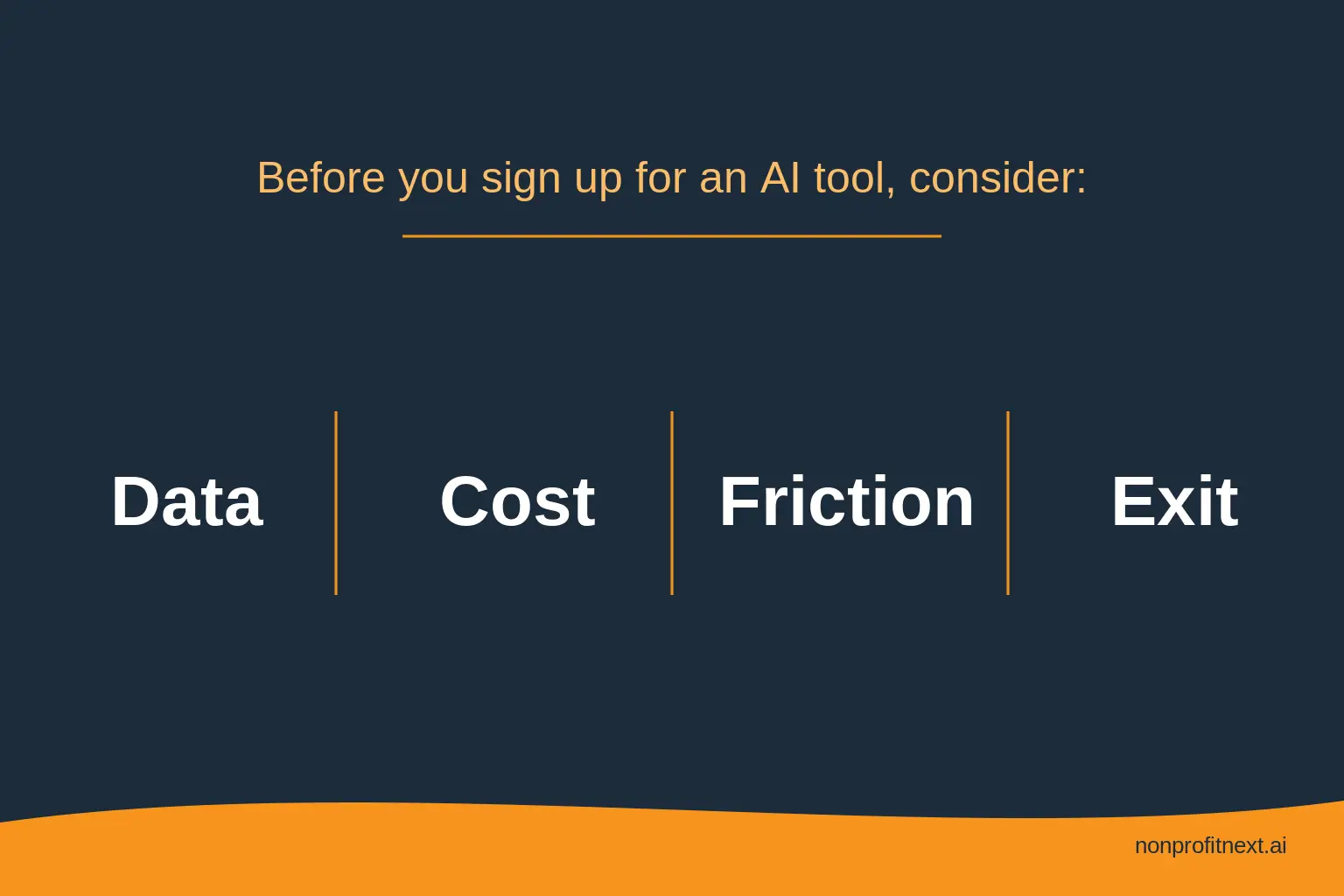
Here is how to choose AI tools for nonprofits without wasting money: name the task you need done, ask four questions about data, cost, friction, and exit, and run a two-week pilot before you spend anything. Search the phrase and you will find list after list, twenty tools, fifty tools, ranked and starred. Almost none of them help with the part that matters, which is picking a tool that fits your work, your data, and your budget. I help small nonprofits make this exact decision, so this post is the method I use instead of the lists.
In this post: why the lists fail you, how to start with the task, the four kinds of AI tools nonprofits actually use, how the major AI assistants differ, the four questions to ask before you sign up, a two-week pilot that costs you almost nothing, and the red flags that mean walk away.
Why the Lists Fail You
A list ranking the best AI tools answers a question you are not really asking. The list assumes the hard part is knowing what exists, but the hard part is knowing which tool fits your organization, your work, your data, and your budget, and no list can know those things for you. Worse, most of the big round-ups are written by companies that sell one of the tools on the list, so the rankings may not be exactly neutral. You could end up with software chosen by someone else’s sales goals, not your needs.
Start With the Task, Not the Tool
The mistake I see most often is starting with the product. Someone reads about a tool, gets excited, buys it, and then goes looking for a problem it can solve. That is backwards, and it is how software ends up paid for and unused.
Instead, try starting with a task your team does over and over that drains their time. Writing grant reports, donor thank-yous, the monthly board report you rebuild from scratch. Name the task first, in one clear sentence. For example, “our program managers spend two hours every week conducting case reviews with most of it trying to gather information from different screens in our database.” Now you have something concrete to judge a tool against. The tool will be whatever addresses the issue identified in that sentence.
Write the sentence down before you evaluate anything. It becomes the standard every product has to meet, and it should be your basis in every sales call or demo.
The Four Kinds of AI Tools Nonprofits Actually Use
Nearly everything being sold to nonprofits falls into four buckets, and knowing the bucket tells you most of what to expect.
First, general AI assistants: ChatGPT, Claude, Microsoft Copilot, Google Gemini. They draft, summarize, rewrite, and answer questions. This is where most organizations should start, because one tool covers dozens of small daily tasks, from donor letters to report summaries.
Second, automation platforms: Zapier, Make, Power Automate. They connect the software you already own and pass information between systems automatically. Not always AI in the strict sense, but they remove the same kind of busywork, and for operations-heavy teams they are often the bigger time saver.
Third, AI features found inside software you already own. Your CRM, your email platform, and your office suite have been quietly adding AI: draft suggestions, summaries, predictions. These features are usually covered by contracts you have already signed and reviewed, which makes them the lowest friction place to look. Check what you already pay for before buying anything new.
Fourth, client-facing AI: chatbots, intake assistants, screening tools. This category touches the people you serve directly, so they should be used with the strictest rules. Done carefully, this is also where some of the most meaningful results can be realized. Our information and referral chatbot case study shows what client-facing AI looks like.
How the Major AI Assistants Differ
People have asked me which assistant to pick. The honest answer is that for nonprofit-related work, writing, and summarizing tasks, the leading assistants are closer in quality than their marketing suggests, and the differences that matter to you are mostly practical.
Start with where your organization already lives. If your team runs on Microsoft 365, Copilot shows up inside Word and Outlook, where your staff already work. If you run on Google Workspace, Gemini sits in Docs and Gmail the same way. The assistant inside your existing suite has a real advantage because nobody has to remember to open a new tab or software.
Your ability to control how your data is treated is also important. Organizational or enterprise accounts on the major platforms let you keep your data out of model training and give you administrative control over who uses what. Free personal accounts often do not. Whichever brand you pick, the organizational tier is the one your policy should sanction. Our data privacy and ownership page explains why we treat this as the first gate, not a detail.
Cost is simpler than the pricing pages make it look. Every major assistant has a free tier, and for most small organizations trying out AI for the first time, the free tier can handle projects related to drafting and summarizing information. When you outgrow it, or you want access to more advanced models, paid plans charge per person, per month, and several platforms offer nonprofit discounts. Free accounts come with a catch: they usually have weaker data controls than paid organizational accounts, and some use what you type to train their models. Use them for drafting and summarizing general work, and keep client names, case details, and anything private out until your organization has a paid account with those controls turned off.
Consider trying multiple options before you make any final decisions about tools you will use. Give two assistants the same real task from your week, a donor letter or a board summary, and compare. Your staff’s preference between the two matters more than any benchmark, because the tool people like is the tool that gets used.
The Four Questions to Ask Before You Sign Up
Before you create an account or enter a credit card, get clear answers to four things.
What happens to your data. Where is it stored, who can see it, and is your information used to train a commercial model. If a client’s details would ever go into this tool, that answer decides everything. If a vendor will not answer plainly, walk away.
What it really costs. Not just the monthly price. The setup time, the training time, and whether the free plan does what you need or is bait for a paid one. A cheap tool that takes ten hours to configure is not cheap.
Who has to change their day. A tool that saves one person an hour but adds three new logins and a training burden for five people is not a saving. Count the friction it creates, not just the time it promises.
What happens if you stop paying. You want your data back in a usable format and a workflow that survives the tool’s departure. If you cannot leave without losing your data or your process, do not sign up in the first place.
A Two-Week Pilot That Costs You Almost Nothing
You do not need a grand rollout either. You need one person to try the tool on one real task for two weeks.
Give the task to the person who feels its pain most. Ask them to use the tool the way they would in a normal week, not in a test once or twice, but as often as possible. At the end, two questions settle it: did it genuinely give time back to them, and do they want to keep using it. If yes, you have your answer and a champion who will help others adopt it. If it sat unused, you learned that for the price of two weeks and no contract.
Here is what that could look like for a small youth organization. In this case, the problem sentence they landed on is “meeting follow-ups take our program director three hours a week.” Before buying anything, they check what they already own and find their video platform includes an AI summary feature under the existing contract. This tool provides a list of action steps at the end of the summary along with who is responsible for them. They pilot it for two weeks: the summaries are decent, the action items need a human pass before being handed off, and the three hours drop to one. If it holds up, two rules go into the AI policy: the feature is approved for internal meetings, and it stays out of any meeting where a young person or family is discussed by name. Total new spend: zero.
Red Flags That Mean Walk Away
A few signs that a tool is built to impress rather than help.
The demo dazzles but you cannot name the specific task it would do for you afterward. The pricing hides the real cost behind an enticing free tier. The company is vague about where your data goes. There is no way to export your data if you leave. It requires your whole team to change how they work before you have seen a single result. The pitch went to your board and skipped your staff. And the loudest selling point is that everyone else is using it.
Every one of those signs points to a company chasing a sale rather than a tool that fits your work.
The Tool Is the Last Decision
Choosing well is less about knowing every product and more about knowing your own work. When you can name the task, protect the people you serve, and respect your staff’s time, the right tool usually picks itself. This is the same order we bring to every decision, mission first and product last, and I lay it out in why the tool comes last.
Common Questions
What are the best AI tools for nonprofits?
The honest answer is that it depends on your task, and any list that says otherwise is guessing about your work. Name the task first, then judge tools against it with the four questions above. For most organizations, a general AI assistant on an organizational account is the right first step.
Are there free AI tools for nonprofits?
Yes. Many of the tasks worth starting with, drafting, summarizing, plain-language rewrites, run on free or low-cost tools, and several platforms offer nonprofit discounts on paid tiers. Free tiers usually have weaker data controls, so check the settings before any real work data goes in.
Is ChatGPT safe for nonprofit work?
It depends on the account and the data. An organizational account with model training turned off, used for drafting and summarizing without client information, is a reasonable choice. A free personal account with client details pasted in is not. The account tier and your data rules decide the safety, not the brand.
How long should we test a tool before committing?
About two weeks of real use by one person is usually enough to know whether it gives time back and whether your team will keep using it. Most of the tasks worth starting with run on tools that are free or close to it, so the main investment is attention rather than money.
If your inbox is full of AI pitches and you want a second opinion before you sign anything, that is exactly the conversation I like having. I am glad to talk it through with you, no jargon, just your questions and clear answers. Book a meeting at calendly.com/larry-nonprofitnext/30min.
Larry is the co-founder and Principal Innovation Strategist at NonprofitNext. Learn more at nonprofitnext.ai.